Heard of HyFlex without really knowing what it covers? You’re not alone. This word circulates in university hallways, in Ministry funding calls, and at EdTech conferences. Here are direct answers to the questions everyone’s asking, followed by a world tour of what it actually looks like on the ground.
The quick answers before going further
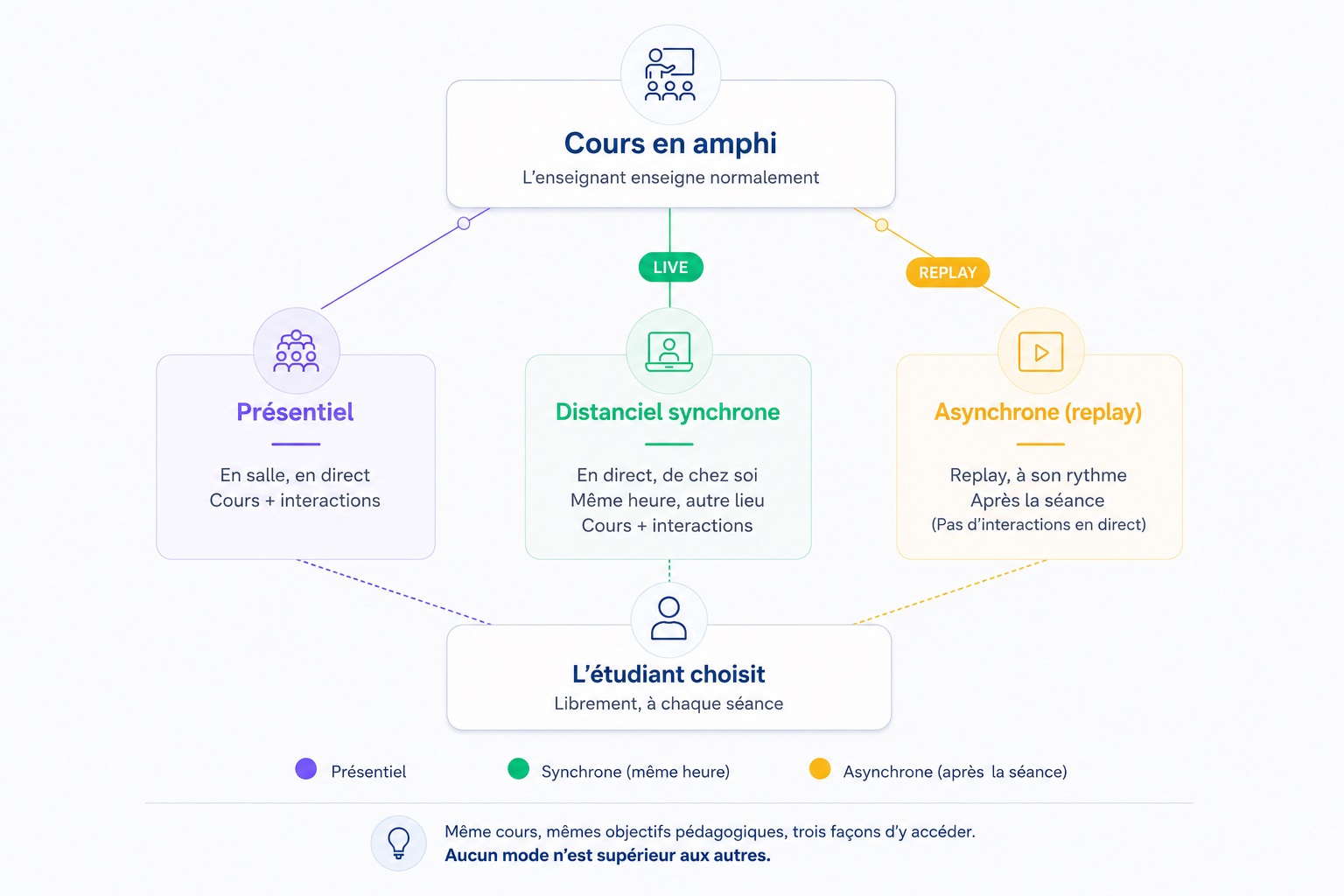
What is HyFlex? HyFlex (a blend of Hybrid and Flexible) is a teaching model that gives students three ways to attend the same class: in person in the room, live remotely via a synchronous connection, or later via a recording. The student freely chooses their mode, session by session.
What’s the difference from classic hybrid teaching? In a traditional hybrid class, the format is decided by the institution: some weeks in person, others remote. In a HyFlex class, the student decides for each session. Flexibility shifts from the institution to the learner.
Are HyFlex and “comodalité” the same thing? Yes, it’s the same concept. “Comodalité” is the term used in France and part of the French-speaking world for exactly what English speakers call HyFlex.
The origin of HyFlex, San Francisco, 2005
HyFlex was born from a concrete problem: in 2005, Brian Beatty, a professor of educational technology at San Francisco State University, faced a tricky situation. The Instructional Technologies master’s program he ran mainly attracted regional, in-person students. But to grow enrollment, he needed to open it up to remote students. The problem was that going fully online would mean losing local students who valued in-person learning, and the institution wasn’t ready for that.
His team looked for existing hybrid models in higher education, without finding one that precisely met their need. Beatty then invented a new solution: a single class, accessible simultaneously in person, synchronously remote, and asynchronously. The student freely chooses their mode, with no need to justify it, session after session.
The term “HyFlex” officially appeared during the 2006-2007 academic year. The model rests on four founding values that Beatty later formalized in his work: learner choice, equivalence of experience across modes, content reusability, and universal accessibility.
The model stayed niche for about a decade, adopted by a few dozen pioneering universities. Then Covid-19 hit. And HyFlex suddenly became the obvious answer to the question everyone was asking at the same time: how do you keep teaching when campuses close?
HyFlex and “comodalité”: two words, one concept
The term HyFlex is American. It has traveled, and along the way, it’s picked up different names depending on the country and institution.
In France, people say “comodalité.” In Canada, some Quebec universities talk about multi-access teaching. In the UK, you’ll find “converged learning” or “flexible hybrid.” Even in the US, several institutions have coined their own brand names: Peirce College calls it “Peirce Fit,” others use “BlendFlex,” “FlexLearning,” “Trimodal,” or even “Mode-Neutral Learning.”
Behind all these names lies the same principle: the student accesses the class through whichever mode suits them that day, with no effect on their grades or academic path.
The difference between HyFlex and blended learning matters. Blended learning alternates between in-person and remote sessions, generally on a schedule set in advance. HyFlex, on the other hand, puts the choice in the student’s hands.
Who’s using HyFlex around the world?
HyFlex is no longer a niche experiment. A systematic review published in 2025 documents its adoption in 12 countries, including Australia, Canada, China, the UK, and the US. Here’s what it looks like in practice at pioneering institutions.
United States: the land of large-scale HyFlex
SF State is unsurprisingly the most advanced university on this front. Today, 40 to 50 officially HyFlex classes are offered there each semester, plus just as many informal hybrid classes where teachers let students choose their mode without formalizing it administratively. The university has equipped around forty rooms to support this model.
Columbia University followed suit. The New York university deployed cameras and microphones in its classrooms to create HyFlex environments, along with comprehensive teaching guides to support faculty.
UC Berkeley School of Dentistry is a more recent and unexpected example. In partnership with Logitech and Zoom, the school expanded its setup from 1 to 4 HyFlex rooms, with a clinic under construction in Emeryville that will include more than 20 equipped rooms starting in 2026. Medicine and health training programs are particularly fertile ground for HyFlex, for obvious practical reasons: students are regularly on placements, on clinical rotations, or unavailable.
Australia: the University of Queensland publishes the world reference guide
The University of Southern Queensland (USQ) has become an international reference. In 2025, it published under a Creative Commons license the most comprehensive freely available HyFlex guide: “HyFlex Learning and Teaching: A Guide for Educational Innovation.” This book, co-written by Drs. Julie Lindsay and Lisa Jacka, covers everything from instructional design to learner assessment. It’s the most cited resource in the recent literature on the subject.
United Kingdom: King’s College London, an emergency rollout that became a model
King’s College London set up HyFlex during the summer of 2020, in three months, to comply with Covid restrictions. The lessons learned were documented and published in an academic journal, making it one of the most studied cases in Europe. KCL’s teams describe the concrete teaching challenges there: how to manage a physical room and a virtual room at the same time, how to keep remote students from feeling like passive spectators.
Sweden: a study on the real effects on students
A study published in 2025 in an international academic journal followed sports science undergraduate students at a Swedish university through a full semester of HyFlex. The goal: to measure learners’ actual perceptions, beyond institutional talking points. The results confirm that flexibility is appreciated, while also pointing to the need for genuine equivalence of experience between modes.
France: Montpellier, five years of HyFlex teaching in law lecture halls
France is no exception, and one example deserves a detailed look.
The law school at the University of Montpellier has been broadcasting all of its lectures live and on replay for more than five years. The principle is simple: the student attends if they can, follows along live from home if they’d rather, or watches the replay later. No steps to take, no justification needed. This is the exact definition of HyFlex applied to a French university.
Technically, the solution is built on Kalyzée’s Kast cameras, paired with a Pod broadcasting platform and full automation via Google Calendar, developed by Kalyzée’s teams. Starting the class is automatic: as soon as the lecture hall is booked in the calendar, the system starts capture and broadcasting. The teacher arrives and teaches — they don’t touch anything.
This case matters because it shows that HyFlex doesn’t necessarily require massive investment or radical changes in teaching. When the technology is well designed, it disappears.
Technology solutions for setting up a HyFlex class
A HyFlex class needs three technological building blocks: capturing the class in the room, broadcasting it live, and making it available as a replay. Depending on the tools chosen, the experience for the teacher and the student can be radically different.
Kalyzée Connect: multi-feed capture, synchronous & asynchronous room broadcasting
Kalyzée is a French HyFlex classroom solution developed since 2014. It equips around fifty rooms across universities, grandes écoles, and training organizations, including the Montpellier law school, many schools, and several prep programs.
Its architecture is designed for simultaneous live broadcasting: capture starts automatically from the institution’s calendar, with no action needed from the teacher. Several feeds are broadcast in parallel (teacher, board, interactive whiteboard, room), and the remote student chooses which one to enlarge on screen. The replay is available immediately after class.
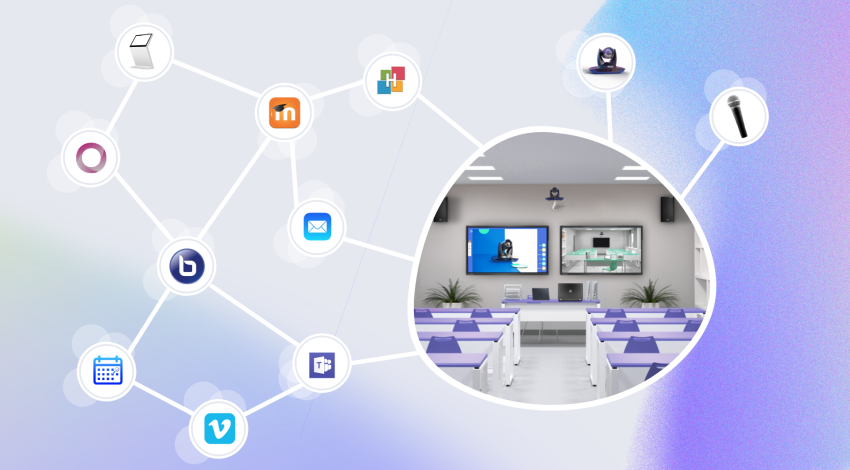
The platform includes native teaching features: automatic attendance tracking, chat, quizzes, polls, a collaborative whiteboard, and the ability for a remote student to speak up. It integrates with the leading LMS and student portal systems on the market.
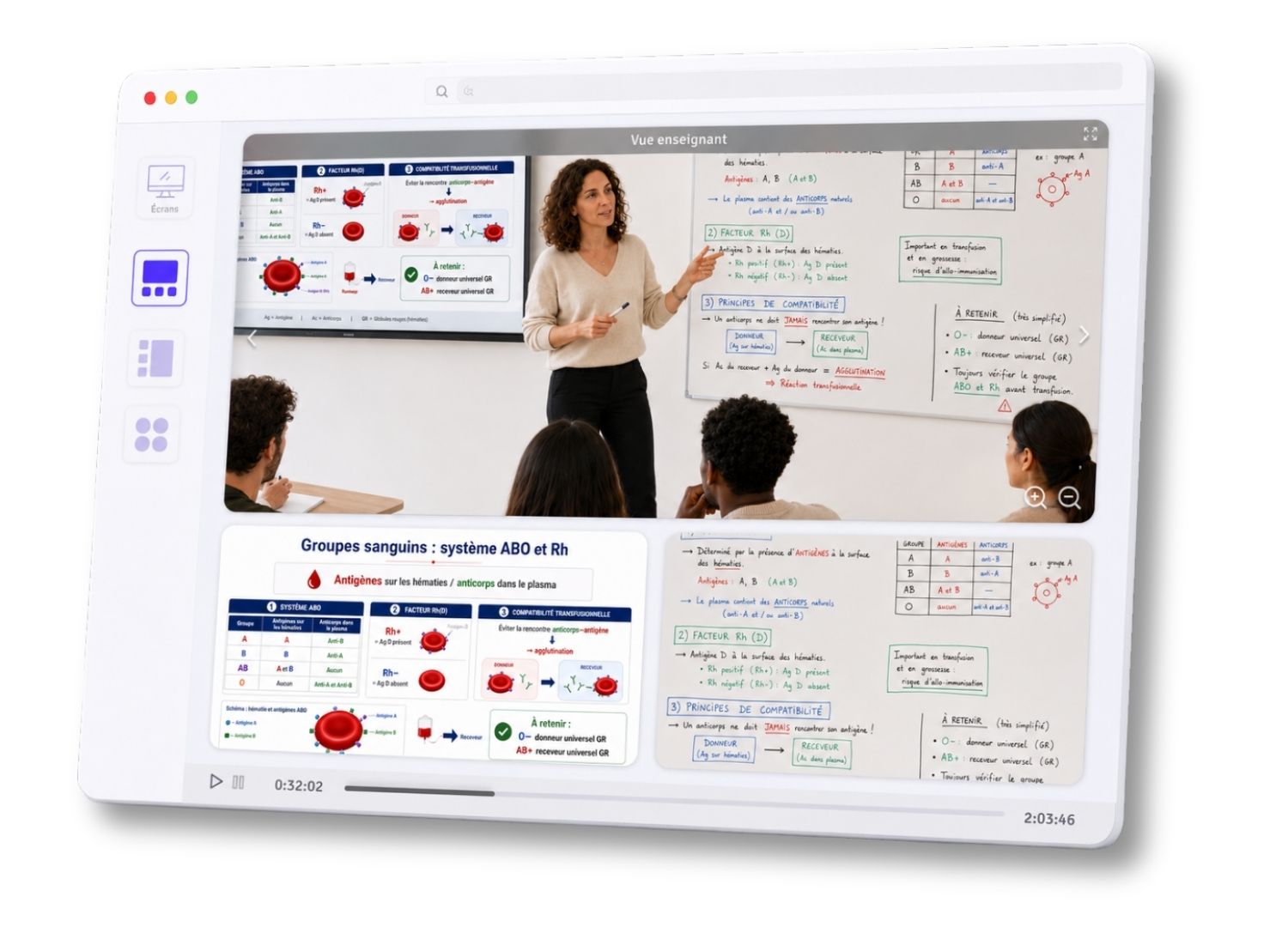
Its distinction from other solutions: Kalyzée covers both synchronous and asynchronous formats with the same infrastructure, with no additional tools needed. Pricing runs around €1 per student and €150 per room per month, with volume discounts.
Zoom and Microsoft Teams: powerful, but originally designed for meetings
Zoom and Teams are the most widely used tools in the world for HyFlex, particularly at American universities. Their ubiquity is a real advantage: everyone knows them, and students already know how to log in.
But teaching HyFlex with Zoom or Teams is a different exercise than joining a meeting. And the tutorials from universities that use them make that clear.
At the University of Oregon, for example, the official guide for setting up a HyFlex classroom with Zoom lists the following steps: turn on the Crestron panel, select HDMI, connect the computer via HDMI to the Crestron and via USB to the camera and microphone, start the Zoom session, manually select the Logitech camera in Zoom’s settings, select the microphone in Zoom’s settings, turn on screen sharing so remote students can see the presentation, and check that the microphone isn’t muted. And that’s all before teaching even begins.
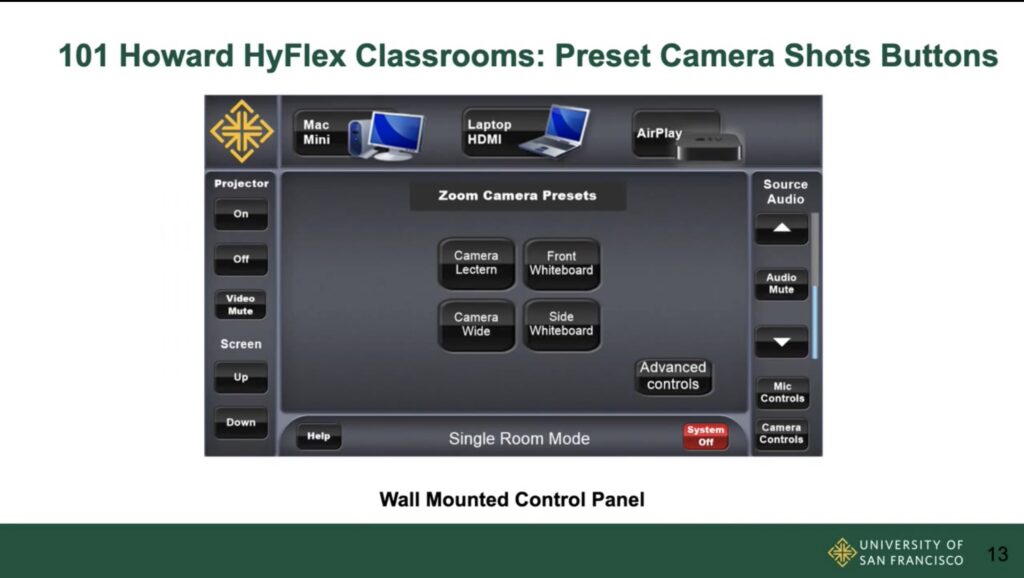
Teachers are advised to arrive in the room as early as possible, start their Zoom session before students come in, check that remote students can hear and see the screen properly, and regularly check the Zoom chat to catch questions from online participants.
The Oregon example is nothing unusual. Every teacher we’ve met as part of HyFlex rollouts, whatever their university, faces the same friction points: the technical startup at the beginning of every class, then manually retrieving and publishing the replay once the session is over.
It’s not insurmountable, but it does take real learning. Many teachers report that this cognitive load adds to the teaching load of the class itself, and that it shows in teaching quality, at least at first.
Zoom and Teams remain excellent tools for video conferencing and one-off teaching meetings. For a systematic HyFlex rollout at the scale of an entire institution, using them requires sustained support for teaching staff.
Webex and BigBlueButton: alternatives depending on context
Webex (Cisco) is very common in health institutions and large organizations, often already equipped with Cisco hardware. It offers HyFlex classroom features comparable to Zoom, with the same manual configuration approach.
BigBlueButton (BBB) deserves a special mention in the French context. Fully open source and natively integrated with Moodle, it’s widely adopted by universities and public training organizations looking to keep control over their digital infrastructure.
Its main limitation for HyFlex use is the lack of native multi-feed support: the remote student receives a single feed, with no way to choose between the view of the teacher, the board, or the room. There’s also no native automation tied to the institution’s calendar.
Panopto and Ubicast: the reference solutions for capture and replay
In the category of solutions dedicated to automatic class capture and managing teaching video libraries, two players stand out depending on the geographic context.
Panopto is the global reference for English-speaking universities. 21 of the top 25 universities in the Times Higher Education world ranking use Panopto as their remote learning technology. UCL London recently adopted it to replace Echo360, and the University of Leeds and Virginia Tech did the same in 2025-2026. The platform covers automatic in-room recording, video library management, LMS integration (Canvas, Moodle, Blackboard), automatic captioning, and searching within video content.
Ubicast holds a comparable position in French-speaking higher education. Founded in 2007 in Paris, it equips Sciences Po Paris (130 rooms) and the University of Lausanne, with a similar architecture: automatic capture via Miris boxes, the Nudgis video platform, Moodle integration, and collaborative annotations.
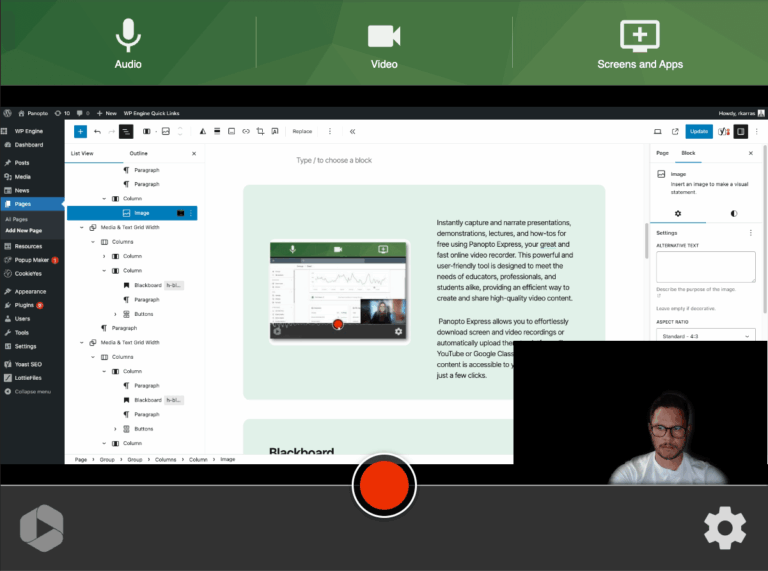
These two solutions share the same logic: they excel at asynchronous delivery and building a teaching video library accessible to students at any time. Their HyFlex coverage handles the third mode (replay) well, but doesn’t natively cover simultaneous, multi-feed synchronous in-person/remote attendance, which remains the core of the model.
Examples of HyFlex that work
The SAMII project with ESCAET: HyFlex for work-study learners
ESCAET, a tourism school and apprenticeship training center in Aix-en-Provence, trains Bachelor’s and MBA students on a work-study basis. Its apprentices work at companies spread across the country, making regular physical attendance in Aix impossible for part of the cohort.
As part of the SAMII project, Kalyzée deployed a custom solution letting every instructor broadcast their classes live and on replay, with automatic attendance tracking. The result: apprentices can follow their training from their workplace without missing content, and teaching teams have the connection records they need for Qualiopi audits.
Medical prep schools: HyFlex for students under pressure
Several medical prep schools partnered with Kalyzée have adopted the HyFlex model for a simple reason: their students have unpredictable schedules, intensive review sessions to manage, and constant pressure.
Being able to rewatch a biochemistry class at 11pm the night before an exam, or attend live from the library while another group reviews in the room, gives a concrete edge on results. At these institutions, replay viewing rates consistently exceed 60% of the cohort within the first few weeks.
Obstacles not to underestimate when starting your HyFlex project
HyFlex is appealing on paper. In practice, several obstacles come up again and again in feedback from the field.
The first is teaching workload. Teaching to two audiences at once, managing remote students’ chat while answering questions from the room, is cognitively demanding. Universities that succeed with HyFlex rollouts invest in pedagogical support for teachers, not just in technology.
The second is equivalence of experience. A student in the room sees the board, hears informal chatter before class starts, and can speak up to the teacher. A remote student can see the same thing, but if there’s only a single fixed camera pointed at the teacher, the experience isn’t equivalent. The technical quality of the setup is decisive.
The third is infrastructure. Research published in 2024 and 2025 shows that HyFlex’s success depends more on institutional investment than on individual teachers’ efforts. A motivated teacher with mediocre equipment and no technical support can’t make good HyFlex happen alone.
These challenges share a common solution: choosing a tool that minimizes technical complexity, so the teacher can focus on what matters — teaching.
Key takeaways on HyFlex
HyFlex is a mature, well-documented model, deployed across dozens of countries and hundreds of institutions. It meets a real need: students with different constraints who all deserve the same quality of teaching.
It’s not a miracle solution. It’s a pedagogical and institutional commitment, one that needs the right tools so it doesn’t become an extra burden for teachers.
If you run an institution and want to understand what a HyFlex rollout actually means for your organization, the Kalyzée team can support you — let’s talk!