
Broadcasting a hybrid event or conference, with a live component, is no easy task. A live broadcast requires preparation, equipment, and resources. It’s not something everyone can do, and it can’t be improvised. Outside providers are often called in, with a team of technical operators and all the necessary audiovisual equipment. A turnkey solution, which still requires a significant budget for a result that’s certainly high quality, but often underused.
There are other, less costly solutions for handling this broadcast yourself. In this article, find tips for filming and live-streaming an event, conference, or gathering, with a concrete example and a testimonial from Mr. Sorroche, communications manager at the Biogenouest network.
A few months ago, Biogenouest organized a scientific conference, which is held every year in person in the Grand-Ouest region. However, the health crisis somewhat disrupted the event, which was held online in 2020 and had to be canceled last year. This past March, a new edition was organized. To guard against any possible Covid-19 developments, the event was broadcast live. A great example of a hybrid event, as Manuel Sorroche tells us.
Of course, going live carries a higher risk, so you prepare, you research, and you test! This article was written to guide you through the adventure of putting together a hybrid event with a live broadcast.
Why go with an online broadcast?
Guarding against the risk of a Covid-19-related cancellation
The 2020 edition of the conference was postponed twice and then held online. Like everything done remotely early in the pandemic, it wasn’t ideal — due to a lack of resources, equipment, planning, and practice. Mr. Sorroche received a lot of feedback and decided that for the 2022 edition, he would prepare for every possible Covid-19-related restriction.
An event of this scale starts being planned a year in advance. However, Biogenouest had no visibility into how the health crisis would evolve. So it was decided to organize everything in a way that would allow switching to fully remote if needed — or to hybrid mode, for example, if capacity limits were put in place.
Extending the conference’s audience
Recording the entire conference can also help extend its audience. Someone unable to travel could follow both days online. That said, it wasn’t ideal for Manuel, who told us there was a lack of interaction with the remote audience. A conference is meant to bring researchers together, create synergies, and even spark future collaborations. Online, researchers were less willing to interact and collaborate.
Live broadcasting therefore isn’t necessarily essential in his case. On the other hand, offering a replay of the talks and workshops helps keep the information relevant over time — which extends the audience in the long run!
How do you capture and broadcast live?
The video capture solution
The University of Rennes 1 has several Kast Revolt Mobile camera kits. This camera can film both the speaker and their PowerPoint presentation. Its distinctive feature is a built-in control unit — meaning it records a video that syncs two video feeds simultaneously and mixes them directly. So there’s no need to know how to edit or to have a Black Magic switcher*, for example — the camera does everything itself.
This solution was perfect for Mr. Sorroche’s needs, since he wanted to film talks and workshops. Discovering the camera lent to him by the University of Rennes 1, he realized it was also possible to go live directly from the camera’s own interface.
The conference was broadcast live from four rooms equipped with Kast Revolt cameras, pre-configured and managed from a tablet. Another advantage of this solution was that the video was also recorded to a local drive.
*a controller for managing different video and audio feeds
The live broadcasting platform
Manuel Sorroche also turned to Eventmaker for the event’s digital organization. Eventmaker is a platform offering tools to manage an event.
The conference had its own small dedicated website for the online event. The platform handled registrations (online and in-person), attendee payments, and also which talks and activities participants wanted to attend. That said, Eventmaker doesn’t handle the capture side, which was done using the Kast cameras as described above.
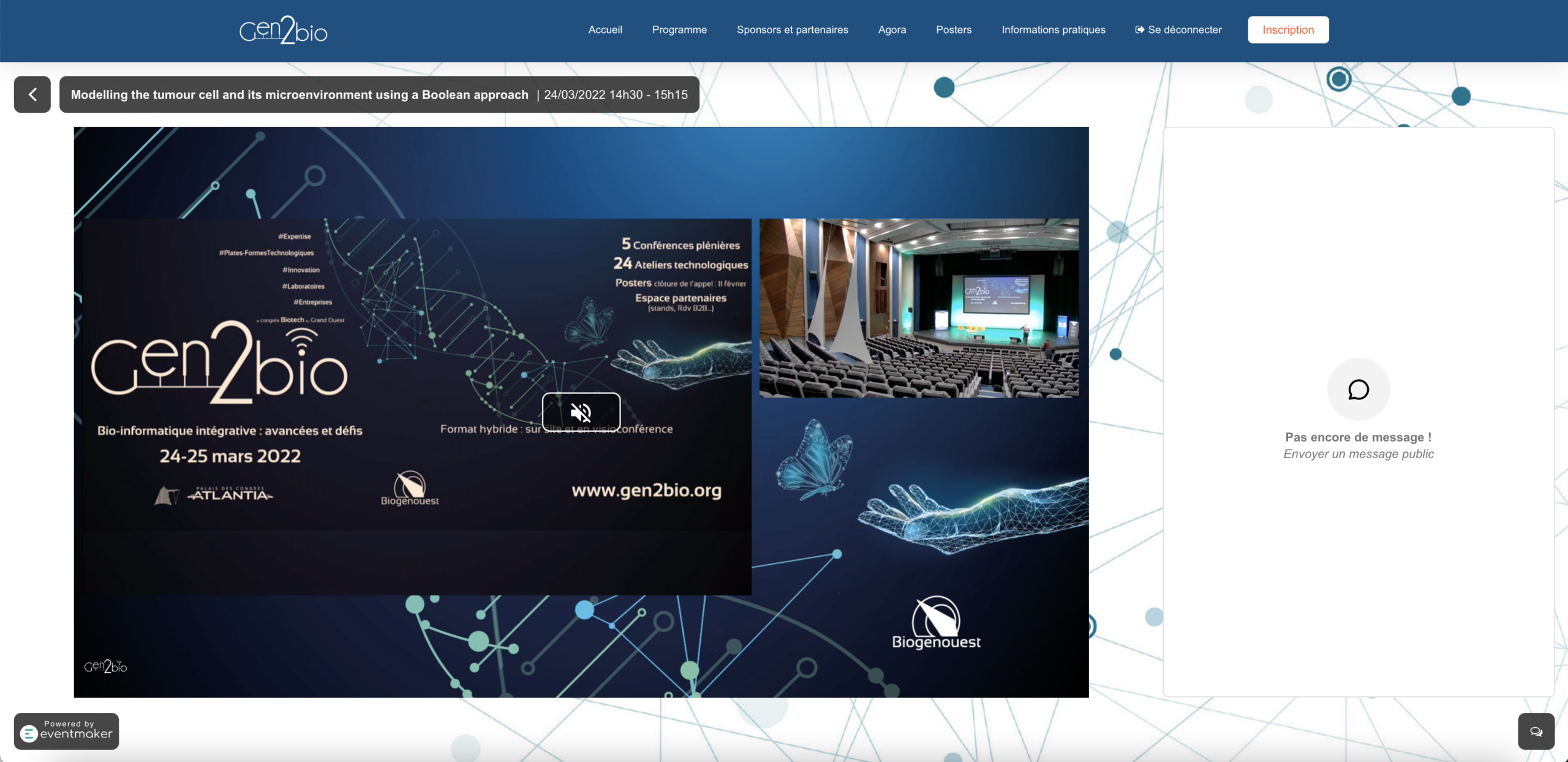
On the day of the event, remote participants simply had to go to the platform and choose what they wanted to watch. The video player also has a chat for interaction.
That said, remote interactions were very limited. The chat was managed by one moderator per room, but very few questions were asked!
The replay platform
Biogenouest publishes its replay videos on Vimeo. The talks and workshops were filmed non-stop over two days. Publishing the replays still requires a lot of work from Mr. Sorroche, who has to cut up the videos and publish the content one piece at a time!
Guarding against the risks of going live
Upfront preparation
An event of this scale required roughly a year of preparation. To start, they needed to find a venue that could host on-site participants while also being able to handle live broadcasts. Streaming 4 live video feeds requires a significant amount of bandwidth — definitely not something to overlook!
Every party involved was called on and had to work together to make sure everything went smoothly on the day. Kalyzée supported Manuel on the technical side, on what the Kast cameras could do, and also on making sure the system was compatible with Eventmaker’s broadcasting platform. Eventmaker had to make sure the live broadcast ran smoothly — a technical team was available online for the entire duration of the event. The technical team at the Palais des Congrès de La Baule (the event venue) also had its network put to the test!
Mr. Sorroche’s advice:
Don’t multiply your tools: the more different tools you use, the higher the risk of a technical glitch, and the harder it becomes to figure out where the problem is coming from.
Make sure every team and every tool is well coordinated and works together.
Test the equipment beforehand, under ideal conditions and then under degraded conditions. Have a fallback plan in case the network degrades — for example, lowering the stream quality in advance to avoid a dropout.
Time to go live!
All the cameras were pre-configured, with custom graphics and preset scenes. That meant no live manual adjustments were needed. That said, it was still possible to switch camera angles or scenes live.
The Eventmaker platform provided responsive online technical support — very important for a live event. That said, no technical glitches came up, only a few human hiccups, like connection issues, which were quickly resolved!
5 people were on-site to make sure the live event ran smoothly — one person per room, mainly to manage interactions and check broadcast quality in real time!
Manuel’s tips for a successful broadcast:
Record locally: very important in case of a network issue. Local recording ensures a quality recording, even if the internet feed fluctuates.
Test the stream from a viewer’s perspective: it’s important to connect a computer as a viewer would, and thoroughly test the sound and the different broadcasts!
Responsive, available technical support: essential so viewers don’t miss a beat of the event if they run into a connection problem!
And there you have it! We hope this article can help or inspire you for your next hybrid events!
Feel free to contact us or leave a comment if you have other tips for capturing and broadcasting live.