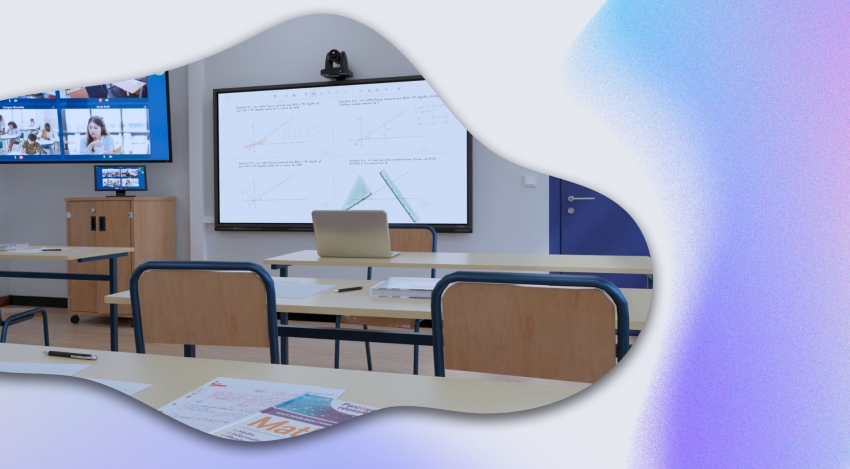

On July 7, we had the honor of hosting Dominique Jaccard, a sound engineer and integration manager at Aix-Marseille University for about a year. Previously working in the live-events industry, Dominique is an audiovisual enthusiast who agreed to share his tips and answer your questions live about setting up a sound system for quality audio in your classrooms and lecture halls, even remotely!
If the teacher has a lapel mic, what do you recommend as a second microphone to capture the students’ voices?
To have interaction with remote students, the sound from the teacher’s lapel mic or handheld mic won’t be enough. The student will be too far away, so the audio signal will be far too weak. You need to capture sound throughout the lecture hall. There are many options depending on the size of the hall or room.
With a drop ceiling that isn’t too high, you can use a ceiling tile microphone — brands like Shure, Sennheiser, or Yamaha. Otherwise, you need room microphones — Sennheiser makes static mics that can be placed in a corner of the lecture hall on a stand, always out of reach of course to prevent theft. Or you could use a handheld mic passed from student to student.
You mentioned a few brands — what have you set up at Aix-Marseille University?
We mainly use the Sennheiser range. For ceiling microphones, we tested both tiles (editor’s note: Shure and Sennheiser). The results we got in terms of voice tone and capture depending on where you are in the room led us to make this choice. The Shure tile also has plenty of strengths, but in a different context.
And in terms of pricing?
Both tiles use very advanced technology, so they’re fairly expensive. But Sennheiser is a bit cheaper than Shure.
Before Covid, what setups were in place?
Ceiling tile technology is recent, so it wasn’t yet in place before last year. Covid acted as an accelerator for setting up remote classes and capture. Before that, we simply had speakers and handheld mics in the lecture halls.
What type of rooms are ceiling tiles recommended for?
For small to medium rooms, up to 50-60 people. Otherwise, you need to increase the number of tiles, or compromise on quality by having the tile further from the speakers with a high ceiling.
Can the tiles be controlled remotely? We’re thinking of technicians who move from room to room.
Yes, Sennheiser developed a control app called Cockpit. For tiles connected to the network, it gives a complete view of the microphones. You can configure and view everything remotely, by site.
So you control your microphones by campus? Because the network is different?
Yes, exactly — our networks are separate. In Aix-en-Provence we control the Aix microphones, and in Marseille the Marseille ones. You can get an overview of the room with key information: whether the tile is on, connected, its pickup direction, sound orientation, the tile’s volume, and its lighting direction (small indicator lights, red or green, for the tile’s direction). You can reduce pickup at the back of the tile to prioritize capturing the teacher.
How many rooms are equipped with tiles?
I don’t have the exact number, but there are a lot!
How can remote people interact with those in person?
The speaker system also needs to be installed and is one of the prerequisites.
How do you handle the installation and integration for using Zoom, for example?
The speaker connects their PC or Mac via USB to a device installed in the room, which redirects the computer’s camera and mic. They also connect via HDMI to project remote participants onto the projector, along with their audio.
What have you been asked to set up for the new school year?
There’s still some uncertainty about what comes next. The momentum created for remote classes is here to stay. We’ve picked up new habits and maybe even new needs. What users are asking for is different from what’s been done so far, and we’ve found it to be really practical — if only for students who can’t travel, due to a physical constraint, for example. So this setup with camera, mic, and so on, is here to stay.
Can the tiles be installed on walls instead of ceilings? Is management the same?
We’ve never tested putting one on a wall, but it seems complicated given the direction of the pickup lobes. It’s not impossible, but managing it would be much harder.
Do you have any other tips to add? Mistakes to avoid?
Everything had to be done in a rush, the situation came on suddenly. The bottom line is that good capture and good results require investment. Avoid going with the cheapest gear — a €200 mic will never give the same result as a €4,000 tile.
In a room equipped with Kast, do you use the camera’s ports or a mixing desk?
Great question! We have different setups, depending on how many microphones are used in the room — sometimes up to 8 or 10 mics. We use a mixer upstream, either digital or sometimes analog. This lets us create a mix-down, combining all the sources. We either send it already embedded in the HDMI signal, meaning a single signal, a single cable to the camera, carrying both video and audio — or we take the mixing console’s output and send the signal into the Kast’s XLR inputs.
Now in some rooms, we plug the Sennheiser tile directly into the Kast camera, via the tile’s analog output.
Have you had the chance to run conferences or events with the Kast? How do you capture audio in that case?
Yes, we have rooms equipped for conferences with up to 8 microphones. Several types of mics are used: gooseneck mics placed on the table, combined with handheld mics and additional lapel mics. In that case, there’s no choice — we use a mixer.
For a 300-seat lecture hall, how many tiles should you plan for? What distance does one tile pick up?
A tile can pick up sound from fairly far away (4 to 5 meters), but the further the tile is from the speaker, the more the room’s acoustics come into play. Beyond 5-6 meters, the room’s acoustics start to dominate, and the sound becomes unpleasant.
For a 300-seat lecture hall, what matters isn’t so much the number of students but the ceiling height. Is it 5 meters or 12 meters? In the second case, you need to lower the tile as much as possible, but that brings other constraints — when you lower it, it might end up in front of the projector, for example, so you may need to place it off to the side instead.
Can you tell us about the different audio input ports on the Kast Revolt camera?
The camera has several audio input sources: first through the HDMI in connector, then two mini XLR inputs with standard adapters where you can plug in your microphone. Finally, a third “line out” jack, where you can pick up the full mix of audio signals coming into the camera for external, secondary use.
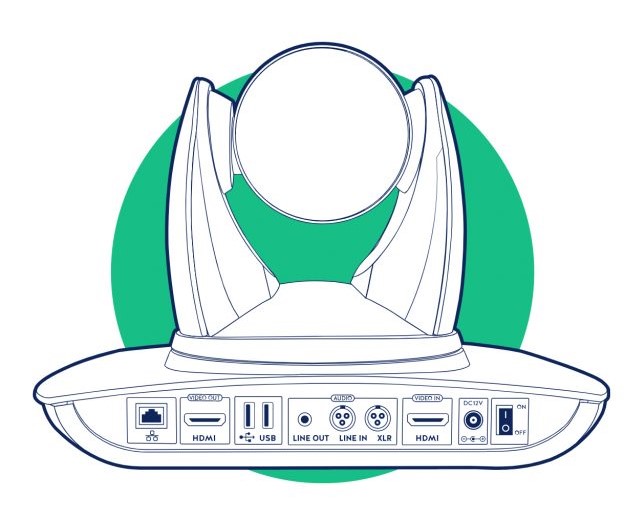
Kast Revolt input & output ports
If two microphones are connected to the camera, it’s currently not possible to distinguish between the two audio sources via the Kast Remote app. Do you have any microphone recommendations that can be adjusted directly, for example that can be muted?
Yes, there is actually a way to work around not being able to adjust the two signals separately. You can use either a wired mic with a mute button. For example, the Sennheiser wired microphone series: 835, 945, 935. Adding an S at the end gives you the same mics but with an on-off switch. Almost all wireless mics, with a transmitter-receiver setup, also have a mute position.
How can I reduce the Kast’s background noise?
You need to go into the audio-in menu, lower the faders to between 10% and 30%, and raise the level of the incoming source.
We’d like to thank Dominique Jaccard for accepting our invitation! If you’d like to learn a bit more about how HyFlex and hybrid teaching have been rolled out at our clients’ sites, we recommend this article: HYFLEX AND HYBRID TEACHING, THE NEW POST-COVID-19 PARADIGM