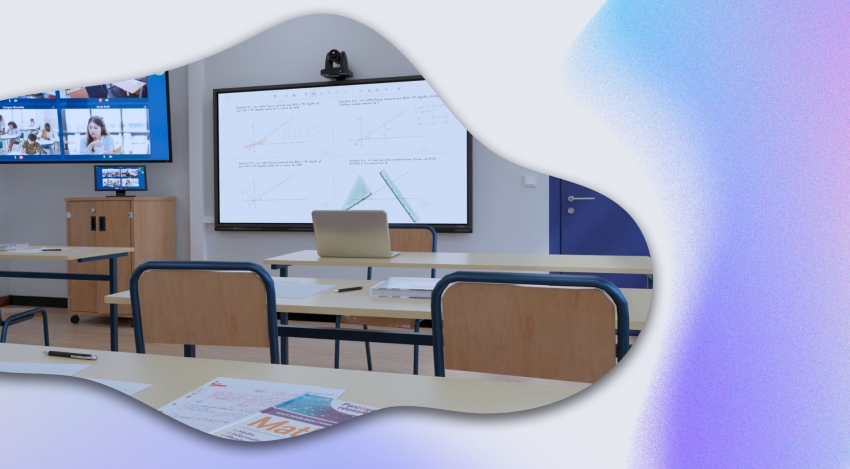
Laying out hybrid training spaces is inherently tied to digital tools, and especially to the communication technologies that Kalyzée specializes in. In this article, we give you all the key elements for successfully laying out hybrid training spaces that deliver a remote learning experience just as good as being on-site.
Successfully laying out hybrid training spaces comes down to 3 key points:
Simplifying the process of publishing and sharing course content
Getting audiovisual equipment suited to the space
Supporting trainers and learners through a digital transition
The benefits of hybrid training
Greater flexibility and accessibility with hybrid training
To start, a quick reminder on the main topic of this article: hybrid, HyFlex training. HyFlex teaching, also known as “synchronous hybrid training,” refers to a teaching approach that combines in-person and remote teaching at the same time, letting learners — whether physically present in the classroom or connected remotely — actively take part in the same learning session in real time.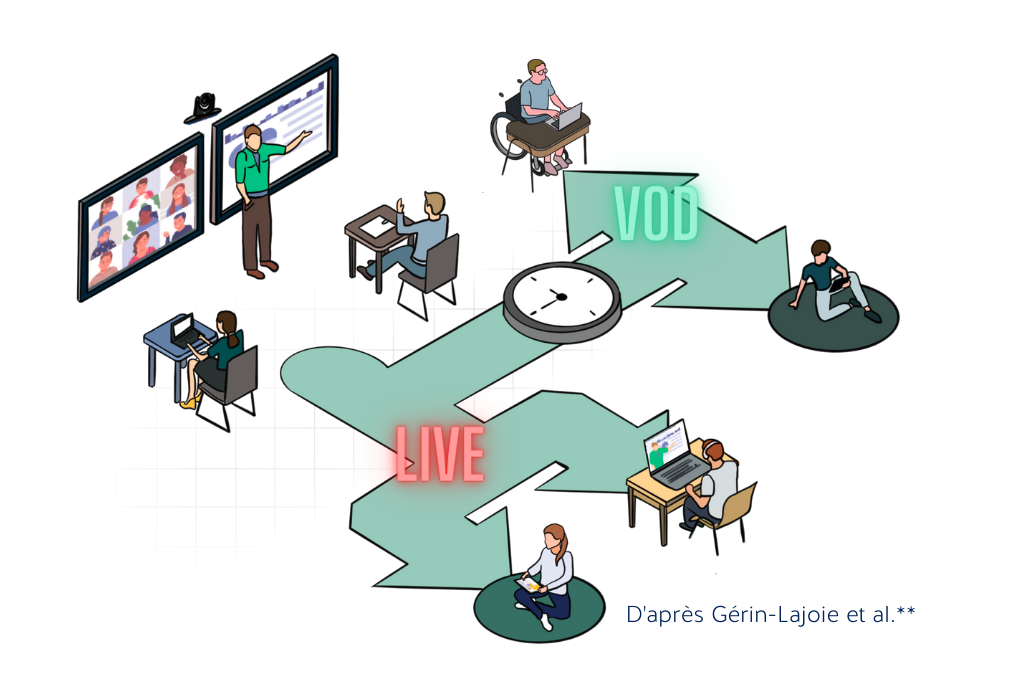
HyFlex training can target either individual learners or groups of learners located on other campuses. In practice, HyFlex teaching merges these two learning modes, while ensuring simultaneous interaction between individual and group remote training.
Meeting the needs of “prevented” profiles
It’s worth remembering that hybridizing training isn’t just a new trend, but a real need for students living far away, adults in continuing education, elected officials, high-level athletes and artists, as well as students with disabilities and people in detention — groups sometimes referred to as “prevented” learners. For them, hybrid or HyFlex training is the best-suited solution to ensure their academic success.
Remote access to education is now within reach for training organizations, which now benefit from advanced ed-tech resources. These institutions can structure their educational programs by drawing on a range of formats such as flexible training, digital hybridization, distance learning, as well as connected campuses and third places. These innovative setups are redefining the notion of mobility and effectively meeting today’s educational expectations.
Simplifying the process of publishing and sharing course content
Hybridization projects often run into several technical issues that are hard for institutions to solve. We’re particularly thinking of course sharing and broadcasting processes, which are often time-consuming and unintuitive, relying on solutions that haven’t evolved in years.
How can the digital transition go smoothly with interfaces designed purely from a technical standpoint?
Yet new technologies now make it possible to automate and orchestrate many steps, making life much easier for trainers who want to hybridize their classes. What’s more, many EdTech companies, French and international alike, are working to simplify sharing interfaces and processes — worth keeping in mind!
Orchestrating hybrid training spaces (classrooms, lecture halls, video studios) with Kalyzée
At Kalyzée, we believe that ease of use for digital teaching tools is the key to success for any hybridization project. We optimize hybrid training spaces to improve both the way teachers share their classes and the way learners access them.
How? Through Kapture: an integrated software platform developed by Kalyzée that orchestrates room equipment. Connected to the trainer’s calendar, it can automatically start, control, and shut down all the audiovisual equipment in a hybrid classroom, eliminating every time-consuming step involved in starting a class — plugging in, sharing, publishing…
The Kalyzée orchestrator comes in the form of a small box, which simply needs to be connected to the various equipment in the room and to the institution’s network.
Controlling the virtual classroom from an intuitive interface for trainers
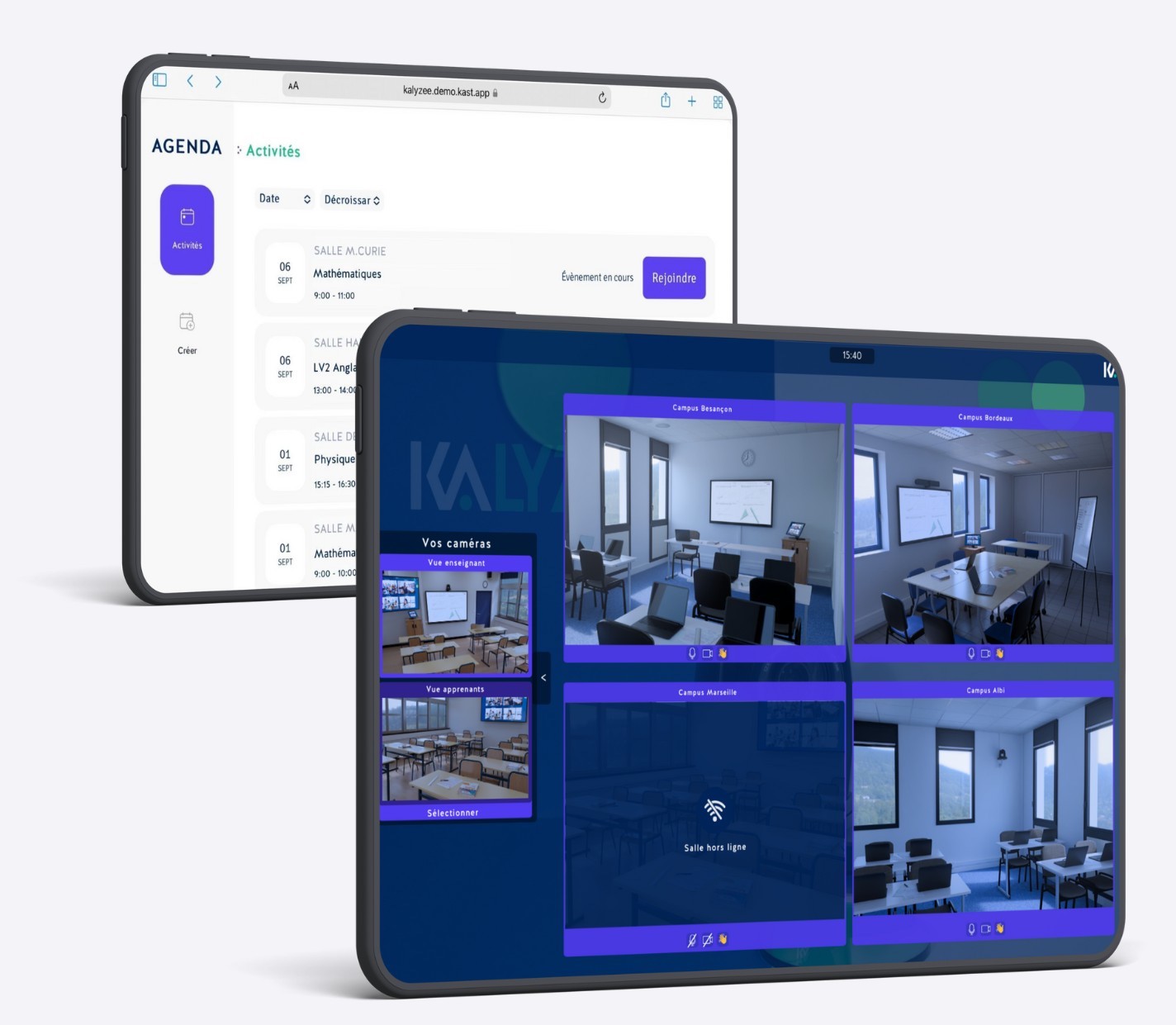
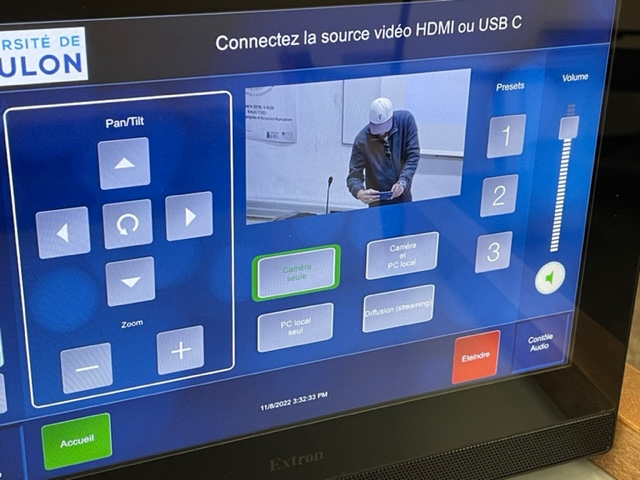
The whole system comes with a control interface in the room: a touchscreen from which the teacher joins the virtual class, and that’s it! Forget complex interfaces meant for technicians, incomprehensible to most teachers, with a maze of buttons, technical abbreviations, and every kind of cable. In the ideal HyFlex classroom, a touchscreen shows a live preview of the class, along with the remote rooms or learners.
Getting audiovisual equipment suited to the space and encouraging interactivity
The physical setup of a hybrid training space depends on several factors, such as the room’s dimensions or its teaching and instructional functions. The audiovisual equipment described below makes up the ideal HyFlex classroom, offering strong interactivity and full immersion for remote learners. Depending on the training center’s needs, the setup can be adjusted by adding, removing, or swapping out equipment.
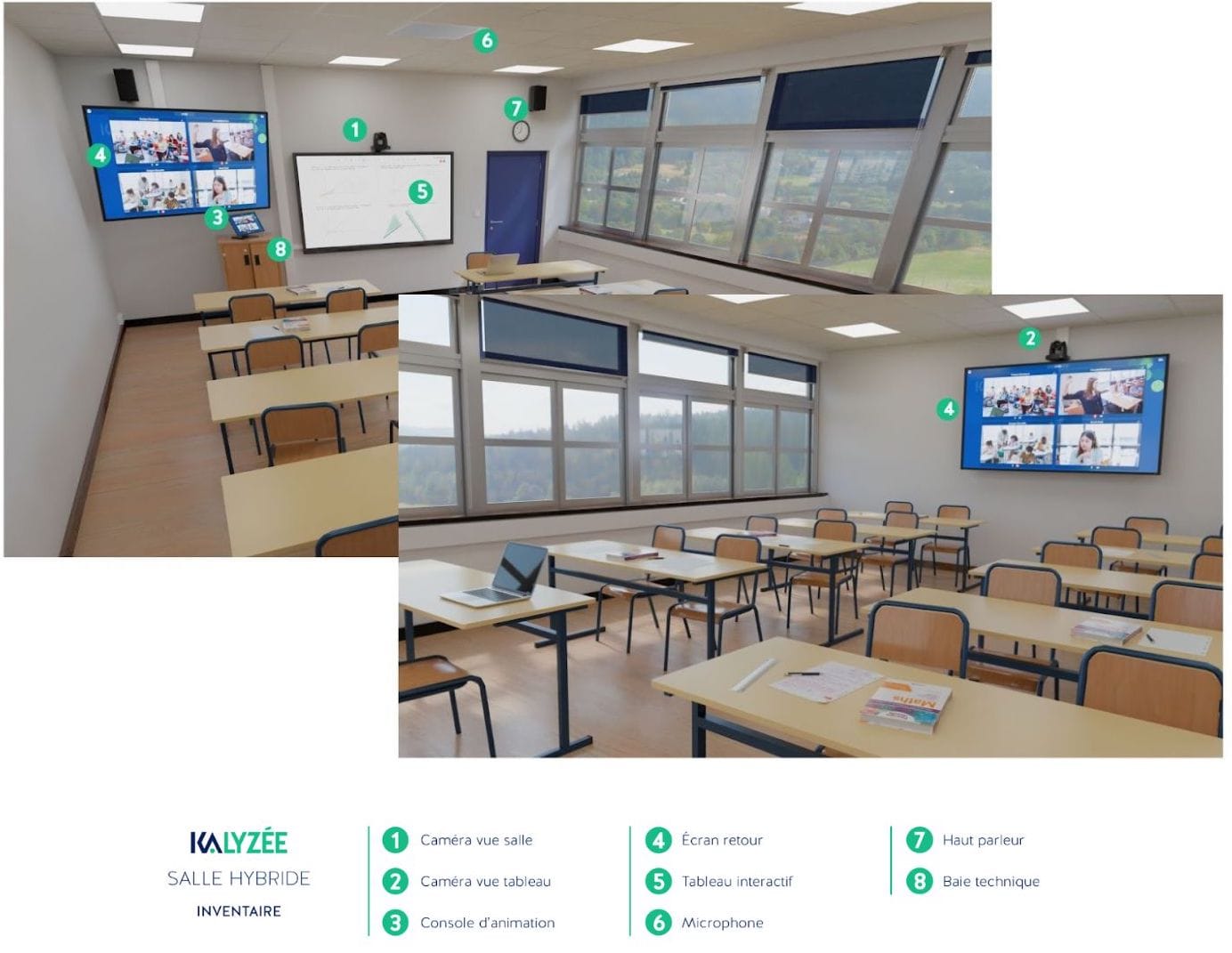
Delivering hybrid training from a classroom is different from a fully remote session. It’s essential that all participants, whether in the room or remote, can clearly see and hear every interaction. Often, what gets transmitted is limited to the teacher, but for full immersion, it’s important that comments from all participants are also audible. The main challenge lies in sound management, which needs to be high quality to keep remote learners’ attention as much as possible.
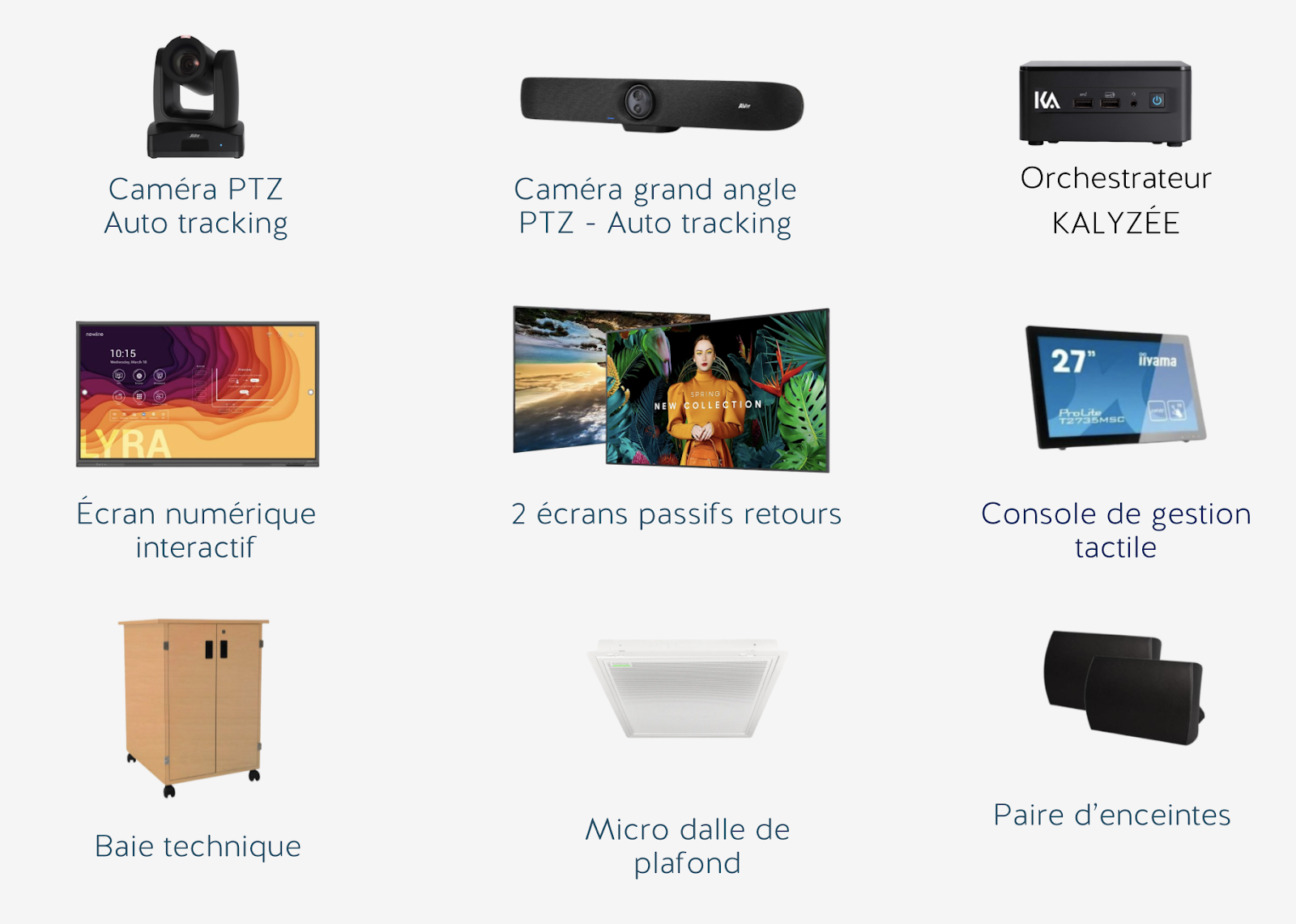
| Category | Description | Specific details |
| Cameras | Two cameras are needed to cover both the teacher and the learners. | – A PTZ camera with zoom for the teacher, at the back of the room. – A high-definition wide-angle camera for the in-person learners. |
| Confidence monitors | Makes it easier for people in the room to see remote participants. | – A screen at the front of the room. – A screen at the back of the room. – 27″ to 75″ depending on room size |
| Board and projector | Replaces the traditional board, digitizing content and annotations. | – An Android interactive board, with the Kalyzée whiteboard app for live sharing. |
| Sound system | A sound system suited to the room’s size is crucial for clear communication. | – A pair of DANTE speakers. – A ceiling tile microphone for more than 25 participants. – Simple ceiling microphones for rooms of 10 to 25 participants. – Speaker and camera-mounted mic for rooms of up to 10 people. |
Supporting trainers and learners through a digital transition
Digital technology is redefining traditional education paradigms, so it’s essential to effectively support trainers and learners through their transition to digital learning environments. This is all the more relevant for hybrid training spaces, where communication technologies play a central role.
Making technology adoption easier
The first step is to demystify the use of digital tools for trainers and learners. At Kalyzée, we focus on ease of use through intuitive interfaces and automated systems like our Kapture software, which orchestrates the audiovisual equipment in hybrid classrooms. This system makes it possible to manage equipment, removing the technical hurdles users often run into.
Ongoing, tailored training
It’s crucial to offer regular training that doesn’t just cover technical aspects, but also includes teaching methods suited to digital tools. These training sessions should be designed by instructional engineers to meet the specific needs of teachers and learners, giving them the skills needed to make the most of digital tools in their hybrid educational activities.
Technical and pedagogical support
For a smooth transition, it’s essential to set up responsive, accessible technical support. This support should be paired with pedagogical guidance, making it possible to quickly resolve issues related to using the technology. At Kalyzée, we provide this support through a network of experts available to help optimize the use of hybrid training spaces and ensure a high-quality learning experience.
Ongoing feedback and improvement
Finally, it’s essential to set up a mechanism for regular feedback with users of hybrid training spaces. This ongoing dialogue not only helps fine-tune the systems in place but also drives innovation based on real-world feedback. This contributes to continuously improving teaching and learning conditions, in step with technological developments and user expectations.
So, ready to transform your hybrid training spaces? Contact us!