A documented comparison of Zoom, Microsoft Teams, OBS Studio, Panopto and Kalyzée Connect: find the right solution for recording and streaming classes.
There is no single best tool for every situation. Zoom is the most straightforward option for a synchronous remote class; Teams is the natural choice for an institution already using Microsoft 365; OBS offers the greatest flexibility at low software cost; Panopto provides the best structure for a large academic video library; and Kalyzée Connect most directly addresses the automation of physical classrooms and HyFlex learning.
| Primary need | Solution to consider first | Rationale |
| Live remote classes | Zoom | Quick setup and synchronous interaction |
| Microsoft 365 ecosystem | Microsoft Teams | Identities, calendar, files and collaboration |
| Cost-effective manual production | OBS Studio | Free, open and highly configurable |
| Institutional video library | Panopto | Search, captions, permissions and LMS |
| Automated physical classrooms | Kalyzée Connect | Multiple streams, HyFlex learning and monitoring |
The solutions are ordered by use case, from remote classes to institutional classrooms. This is not a ranking.
Our comparison methodology in detail.
This comparison is published by Kalyzée, the company behind Kalyzée Connect, one of the solutions analysed. To make this position verifiable, the criteria are published, features are linked to official sources, and both competitors’ advantages and Kalyzée’s limitations are made explicit. The assessments remain editorial analysis and are no substitute for a pilot or a quote.
Objectives & sources
To compare five genuinely different ways to record a class: standalone videoconferencing, a collaboration suite, a software production studio, an institutional video platform and an automated HyFlex classroom. The capabilities and conditions described are based primarily on product pages, help centres and official documentation.
The eight criteria assessed
| Criterion | Question asked |
| Setup | Can an instructor begin without a technician? |
| Live delivery and interaction | Are chat, questions, reactions and remote participation easy to use? |
| Classroom capture | Are audio, cameras, the whiteboard and multiple sources orchestrated? |
| Automation | Are scheduling, start, stop, publishing and alerts automated at scale? |
| Replay | Is the content easy to find, caption, edit and reuse? |
| Integration | Are the LMS, SSO, calendar, directory, API and permissions covered? |
| Operations | Can multiple classrooms, users and incidents be monitored? |
| Total cost | Are licences, equipment, storage, network, support and staff time transparent? |
Comparison at a glance
The ratings indicate suitability for the need, not measured performance. ‘Requires integration’ means that the outcome depends on additional equipment, a platform or organisational arrangements.
| Solution | Remote live delivery | Physical classroom | Automation | Replay / search | Governance |
| Zoom | Very strong | Requires integration | Moderate | Standard | Strong, depending on plan |
| Microsoft Teams | Very strong | Requires integration | Moderate | Standard | Very strong within M365 |
| OBS Studio | Strong | Manual | Limited | Requires integration | Must be built |
| Panopto | Strong | Strong | Very strong | Very strong | Very strong |
| Kalyzée Connect | Very strong | Very strong | Very strong | Strong | Strong, French context |
Summary of the study findings
- Zoom and Teams are entirely valid choices whenever a class primarily resembles an interactive online meeting.
- OBS is not an academic platform, but it may be the best choice when an operator needs precise control over production and encoding.
- Panopto becomes relevant when the real challenge begins after recording: cataloguing, searching, captioning, securing and publishing thousands of videos.
- Kalyzée Connect becomes relevant when the real challenge begins in the classroom: multiple cameras, whiteboard, audio, automatic start, live delivery and multi-campus monitoring.
- A school can combine tools: for example, Teams or Zoom for virtual classes, followed by a video platform or classroom solution to automate replay and lecture-theatre operations at scale.
The business model of each recording and streaming solution
| Solution | Model | Often-overlooked costs |
| Zoom | Limited free plan, then subscriptions / education contracts | Rooms, storage, add-ons, network and support |
| Microsoft Teams | Depends on the Microsoft 365 Education licence | Teams Rooms, equipment, storage and administration |
| OBS Studio | Free, open-source software | Computer, capture hardware, operator, hosting and maintenance |
| Panopto | Institutional pricing by quotation | Storage, modules, migration, integrations and services |
| Kalyzée Connect | Published software price + equipment / installation | Classroom equipment, cabling, maintenance and replacement |
How should the cost of each solution be calculated?
Compare over four years: licences + equipment + installation + storage and traffic + maintenance and support + captioning + operating time + exit costs. Free software or an already-included licence can still be expensive if operations require substantial staff time.
Published prices are not directly comparable: they may be calculated per user, room, capacity, storage allowance or module. The only defensible comparison uses the same scenario for classrooms, students, recorded hours and service level.
1. Zoom
What need does it address? Zoom is the most obvious choice for quickly launching a synchronous remote class, inviting external participants and retaining a simple recording of the session.
The platform highlights HD audio and video, screen sharing, collaboration tools, noise reduction, translated captions depending on the plan, continuous messaging and sharing recordings after the meeting. Zoom Rooms extends the ecosystem to equipped rooms, but requires separate audiovisual design and licensing.
The Basic plan is advertised as free, with a 40-minute limit per meeting and up to 100 participants. Paid plans increase meeting duration, cloud storage and capabilities; education and enterprise terms must be confirmed through a quote or the current pricing page.
Strengths
- Quick to learn and an experience already familiar to many instructors and students.
- A very strong foundation for live delivery, screen sharing and synchronous interaction.
- Easy access for external speakers and use across multiple devices.
- Education ecosystem, integrations and the Zoom Rooms offering.
Limitations to check
- A meeting recording is not, by itself, a lecture-theatre capture workflow: microphones, cameras, whiteboard, framing and acoustics still need to be designed.
- Structuring a video library by course, granular permissions, retention, searching the video archive and LMS publishing may require an additional platform.
- The actual cost depends on licences, storage, Zoom Rooms, equipment and support; compare TCO, not just the price per user.
Zoom verdict
Choose it first for a straightforward remote live class. Add another solution when you need to automate physical classrooms or manage a large educational content library.
2. Microsoft Teams
What need does it address? Teams is often the most pragmatic choice when an institution already uses Microsoft 365 Education: identities, calendar, files, groups, meetings and collaboration all reside in the same environment.
A meeting recording captures audio, video and screen sharing; live transcription can be enabled subject to permissions. Recordings are stored in OneDrive for Business or SharePoint, making it easier to apply Microsoft 365 policies.
Microsoft’s documentation also specifies capture limitations: some collaborative elements do not appear in the recording, including whiteboards and annotations, shared notes, content shared by certain applications, and some animations or videos embedded in PowerPoint Live. The exact output must therefore be tested against real-world use cases.
Strengths
- Consistency with Microsoft 365 accounts, groups, calendars and files.
- Meetings, conversations, documents and group follow-up in a single space.
- Recordings stored in OneDrive or SharePoint, with governance aligned with the existing environment.
- Relevant for institutions already using the ecosystem, with a potentially low marginal cost depending on their licences.
Limitations to check
- Administrator policies, licences and retention periods determine access to recordings and transcripts.
- Like Zoom, Teams does not solve lecture-theatre acoustics and audiovisual orchestration on its own. Teams Rooms and certified equipment can complete the setup.
- A large course media library may require more specialised video organisation, search and editorial workflows.
Teams verdict
Choose it first if Microsoft 365 is already the institution’s digital foundation. Its advantage comes less from superior capture than from integration with the existing working environment.
3. OBS Studio
What need does it address? OBS Studio is free, open-source production software for recording or streaming a class with a customised production. It suits an independent instructor, an educational studio or a technical team prepared to configure and operate the production.
OBS organises a production into scenes and sources: camera, screen capture, window, media, text or capture card. It includes an audio mixer with filters and provides precise control over encoding and streaming.
Strengths
- No software licence cost and a large community.
- Freedom of composition: picture-in-picture, multiple cameras, titles, media and transitions.
- Fine-grained control over audio, sources, encoding and streaming destinations.
- An excellent tool for studio productions, produced webinars or classes requiring bespoke production.
Limitations to check
- Operation is mainly manual: preparing scenes, checking inputs and monitoring the recording.
- No native LMS, SSO, course-level permissions, media library, retention, institutional captioning or monitoring of a classroom estate.
- Zero software cost does not mean zero total cost: a powerful workstation, capture cards, storage, an operator, documentation and maintenance must all be budgeted.
OBS verdict
Choose it first to produce a carefully controlled video manually with a minimal software budget. Avoid it as the sole foundation if the objective is to automate dozens of classrooms and govern content.
The camera is not the system
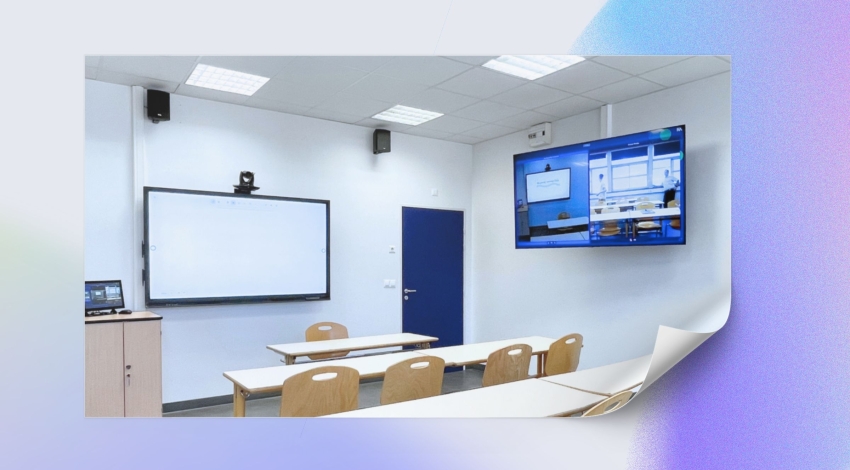
In a real classroom, a 4K image compensates neither for an inaudible voice, an illegible whiteboard nor a forgotten recording. The outcome depends on the entire chain: microphones, acoustic treatment, framing, lighting, computer sources, synchronisation, network, triggering, storage, permissions, publishing and support.
4. Panopto
What need does it address? Panopto is an institutional video platform designed to automate capture, publish classes and manage a large-scale academic video library.
Capture can be automated using audiovisual equipment and timetables, then published within the course. Panopto particularly highlights search across spoken words, slides and items visible on screen, along with captions, transcripts, quizzes and editing tools.
Documented integrations cover the leading LMS platforms as well as videoconferencing tools; administration features include SSO, roles and permissions. The enterprise offering is sold by quotation.
Strengths
- Very strong ability to find a precise passage within a large video library.
- Automated capture and publishing, captions, transcription and enriched replays.
- LMS integrations and collaboration tools suited to an institutional deployment.
- Documented security: encryption, AWS hosting, certifications and data-residency options.
Limitations to check
- Pricing is not public: request a detailed quote covering licences, storage, live streaming, modules, migration and services.
- The platform integrates with audiovisual systems, but classroom results depend on the equipment, integration and local support.
- Data residency, subprocessors, transfers, reversibility and service commitments must be contractually defined.
Panopto verdict
Choose it first when the main challenge is making sustainable use of thousands of hours of classes: indexing, accessibility, permissions, search and LMS integration.
5. Kalyzée Connect
What need does it address? Kalyzée Connect is a French solution focused on classroom-based teaching, HyFlex learning and campus interconnection. It aims to automate capture, live delivery and publishing while reducing the actions required of the instructor.
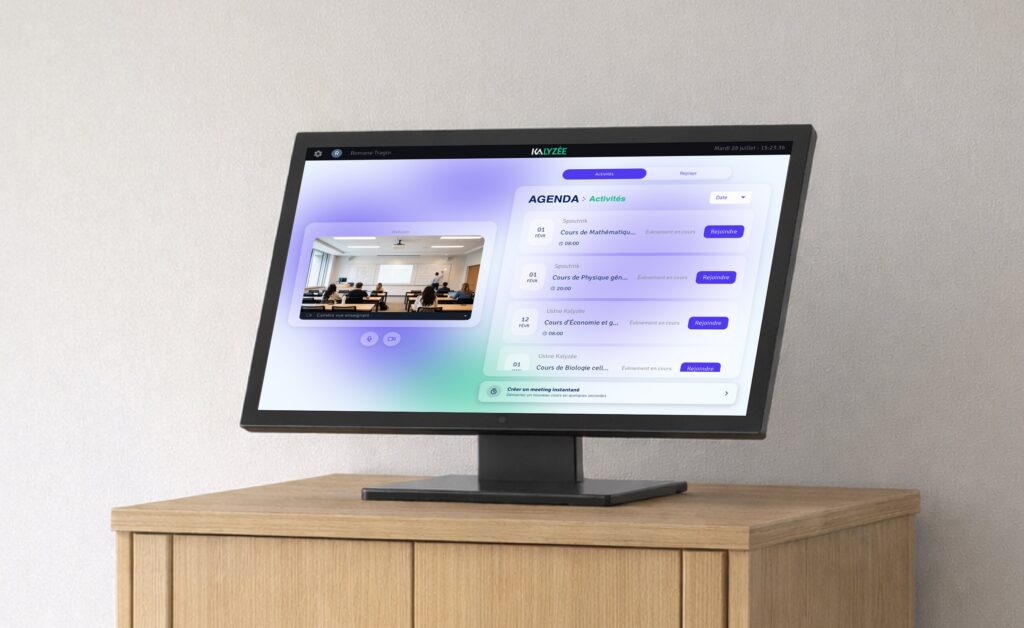
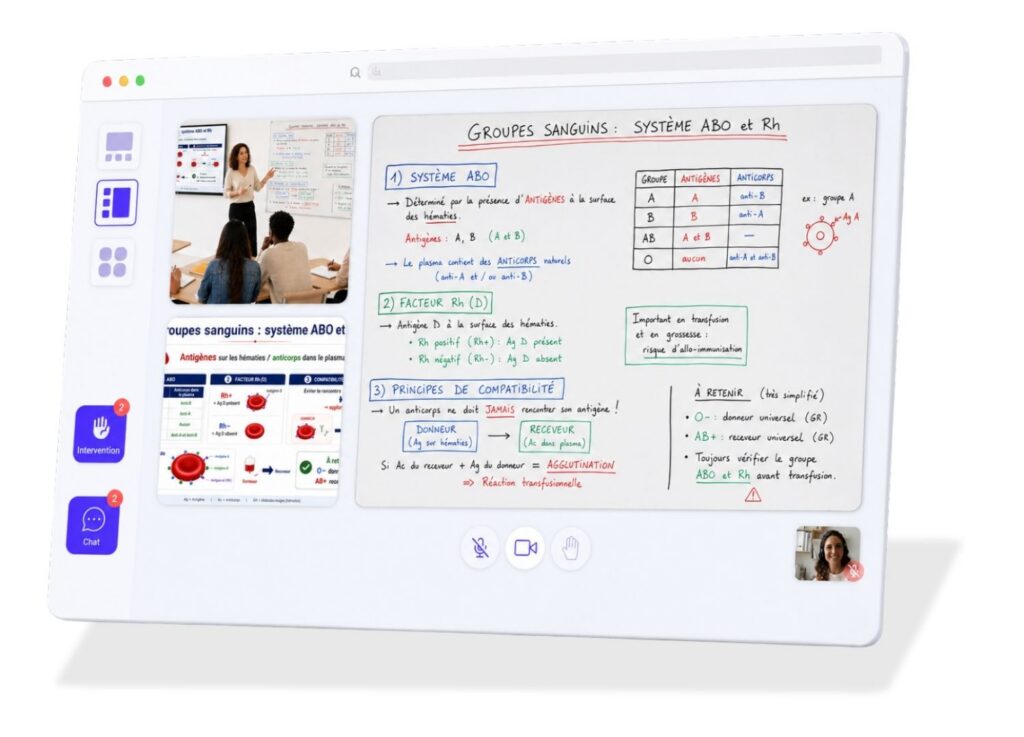
Kalyzée broadcasts three to four independent sources (instructor, whiteboard, lecture theatre or screen), allowing learners to choose their view. The platform also offers chat, questions, hand raising, quizzes, polls and replay, as well as Moodle, API and SSO integration. Everything is fully automated: the platform orchestrates the classroom equipment, live transmission and recording, with nothing required of the instructor. No connections, no configuration, no preparation.
The solution includes audiovisual integration for the classroom, schedule synchronisation and monitoring. Kalyzée states that it hosts data in France and has deployed its solution across more than forty campuses.
Strengths
- Very strong fit for HyFlex classrooms, multiple streams and multi-campus programmes.
- A coherent chain linking cameras, audio, whiteboard, schedule, live delivery, replay and monitoring.
- Learner-selected views and interactions designed to connect in-room and remote participants.
- Hosting in France, integration support and published software pricing.
Limitations to check
- Full-text search of speech, automatic captioning and some accessibility details are less advanced than Panopto’s.
- Final quality and budget depend heavily on the condition of the classroom, its acoustics, cabling and the equipment selected.
- Claims concerning hosting, support, availability, reversibility and performance must be converted into measurable contractual commitments.
- The published price is €1 per student per month plus €150 per classroom per month with an annual commitment; equipment and installation are additional and must be costed classroom by classroom.
Kalyzée Connect verdict
Choose it first when the challenge is to automate physical-classroom capture and live HyFlex delivery at scale. Panopto retains the advantage if the absolute priority is searching and managing a vast video library.
Which solution for your scenario?
| Scenario | First choice | Alternative / combination |
| An instructor streams from home | Zoom | Teams if Microsoft 365 is already mandated |
| A class works in M365 throughout the year | Microsoft Teams | Panopto if replays need to become a media library |
| A studio needs a bespoke production | OBS Studio | Stream to Zoom, Teams or a video platform |
| A university already owns thousands of videos | Panopto | Also compare YuJa, Kaltura and EchoVideo |
| Lecture theatres need to start automatically | Kalyzée Connect | Panopto with audiovisual integration, depending on the project |
| Different campuses need to attend the same class live | Kalyzée Connect | Teams or Zoom for a meeting-style format |
| The initial software budget must be minimal | OBS Studio | Factor in staff time, equipment and hosting |
Institutional alternatives not to overlook
YuJa, Kaltura and EchoVideo have not disappeared from the market simply because they are not included among the five archetypes compared here. They should be included in a procurement process when an institution is seeking another institutional video platform, high modularity or specific teaching and analytics features. This document prioritises five clearly differentiated approaches instead of five nearly equivalent products.
Making a replay available does not guarantee that it will be used. A study of 78 videos from a university mechanics course found significantly greater use of videos directly connected to activities than of general lectures, engagement with which declined over the semester. Perceived educational value, the ease of finding the right passage and integration within the course matter just as much as capture.
The pilot you should require before making any decision
The pilot must take place in a real classroom, with a real instructor, the institution’s network and LMS, and its actual constraints. A controlled sales demonstration is not enough.
- Measure the intelligibility of the instructor’s voice and students’ questions, including when the speaker moves around.
- Check the legibility of the whiteboard, a projected demonstration and multiple sources displayed simultaneously.
- Test scheduled start, stop, recovery after an incident and automatic replay publishing.
- Measure end-to-end latency and involve real remote students.
- Check SSO, groups, permissions, LMS, calendar, grades, downloads and retention periods.
- Test captioning, transcription, search, chaptering, editing and keyboard / screen-reader accessibility.
- Simulate a microphone, camera, computer or network failure, and check alerts and support escalation.
- Request a complete export of videos, metadata, captions and logs in order to calculate reversibility costs.
- Compare the four-year total cost: licences, storage, traffic, equipment, installation, maintenance, support, captions and staff time.
Decision framework: choosing a solution to record and stream classes
| Indicator | Threshold to define before the pilot | Evidence expected |
| Successful start | % of classes launched without intervention | Logs covering several weeks |
| Intelligible audio | Listening-test result across several areas | Unprocessed recordings |
| Latency | Maximum acceptable according to the interaction | End-to-end measurement |
| Publishing | Time until the replay is available | Platform and LMS timestamp |
| Accessibility | Expected level and accuracy | User testing and caption sample |
| Support | Response and resolution times | Real support ticket during the pilot |
We wish you every success with your broadcasts!
The choice becomes simpler once the main problem has been identified. For a standalone virtual class, Zoom is the starting benchmark. In an institution already organised around Microsoft 365, Teams minimises disruption to established practices. For highly customised manual production, OBS Studio offers great flexibility. For an academic video library operated at scale, Panopto is the strongest candidate in this selection. For automating physical classrooms and connecting in-person and remote participants, Kalyzée Connect is the most directly specialised candidate.
This conclusion therefore does not award Kalyzée first place overall. It identifies the best fit for each scenario, publishes the limitations of every option and leaves the final decision to a measurable pilot.