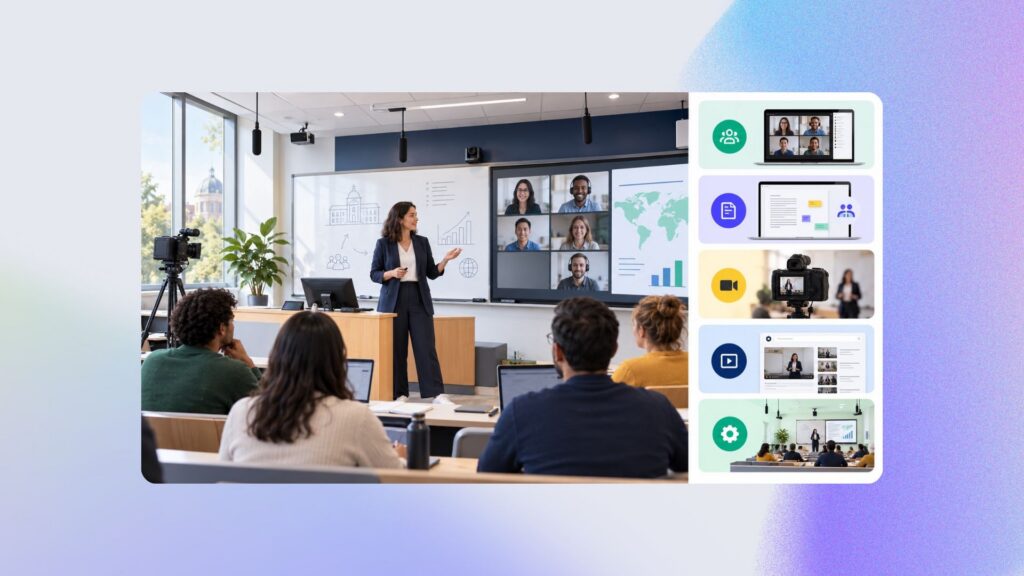
To record and stream classes under the right conditions, a webcam and videoconferencing software are generally not enough. You need to coordinate the capture of the instructor, the whiteboard and their presentation, ensure intelligible audio, stream the class live and then publish the recording automatically. Kalyzée Connect brings these functions together in a solution designed for universities, schools, apprenticeship training centres and training providers.
In the age of digital technology, remote working and personalised learning, offering several teaching formats is no longer a luxury: hybrid learning is essential to accommodate learners’ constraints, schedules, needs and preferences.
The figures confirm it. Among the nearly 130,000 training providers in France, fully remote learning has lost momentum (accounting for around 30% of enrolments in training since 2024), while in-person learning alone is no longer enough. The format gaining ground is a blend: in 2025, blended learning accounted for 65% of training delivered, up 17 percentage points in one year. In other words, the future is neither fully in-person nor fully remote, but both at the same time!
In this guide, we take you on a journey through HyFlex learning: concrete examples of successful deployments, as well as technical and practical advice to help you get started, tailored to your budget and teaching needs, without ever overlooking ease of use for instructors or integration with your existing tools.
Audit your ecosystem and needs
Before choosing a camera, you need to take an honest look at what you already have. This is the most important step, and often the most overlooked. A thorough audit prevents you from buying unsuitable equipment or replicating remotely practices that work poorly in person. It covers three complementary areas: your tools, your learners and your instructors.
Your technical ecosystem
Start by listing all your tools: your LMS, your ERP system, your calendar and your classroom equipment. Write everything down, even what seems incidental. Then take the time to challenge each component. The fact that a tool is already in place and works is not, by itself, enough to justify it.
Ask concrete and slightly uncomfortable questions. How much time do you spend organising classes each week? Half a day? How much time do you spend recording your videos, then publishing them one by one? Several hours? These invisible points of friction are what cost the most over the course of a year. By quantifying them, you can identify precisely what needs to be automated or simplified.
Do not impose any limits on yourself at this stage. Describe your ideal classroom exactly as you would dream it, without thinking about the budget yet. This target will serve as your compass. Deployment will then consist of getting as close to it as possible, based on the resources actually available to you.
Your learners’ needs
The second question concerns the purpose. Why switch to hybrid learning? Why stream your classes? There is rarely a single answer. Most institutions pursue several objectives at the same time.
- Increase enrolment by removing geographical barriers.
- Better include apprentices, who often travel or live in another city.
- Make training accessible to people who cannot attend, people with disabilities, those who live far away or have family commitments.
- Bring in experts or instructors based elsewhere without requiring them to travel.
- Share a classroom and stream the same class to several campuses at once.
- Offer recordings to absent learners and turn them into revision tools.
Most often, it is a combination of all these things. The important point is to prioritise them. Your two or three true priorities will guide all your subsequent technical choices. A classroom designed to connect isolated sites will not have the same configuration as one designed for revision through recorded classes.
Your instructors’ needs
This is the most frequently overlooked point, yet it is the most decisive. Even the best system in the world is useless if instructors do not embrace it. An intimidating classroom setup ends up unplugged in a corner.
So consult your teams before making a purchase. Who will lead the project internally? Who will train the instructors and provide day-to-day support? What is genuinely causing them problems today? Is your LMS used effectively, or is it underused because it is not simple enough? Are your instructors comfortable with technology, or are they wary of innovation?
All these answers converge on one guiding question. How can you make their lives easier so that they have only one thing left to do: teach? More than the equipment specifications, this criterion will determine the success of your project.
Define your HyFlex project
Once the audit is complete, you need to define precisely what you want to do. HyFlex learning actually encompasses several very different uses. Confusing them leads to a poorly sized installation. Clarifying them, by contrast, enables you to choose the right equipment from the outset. Here are the four most common scenarios.
Connect multiple classrooms or campuses
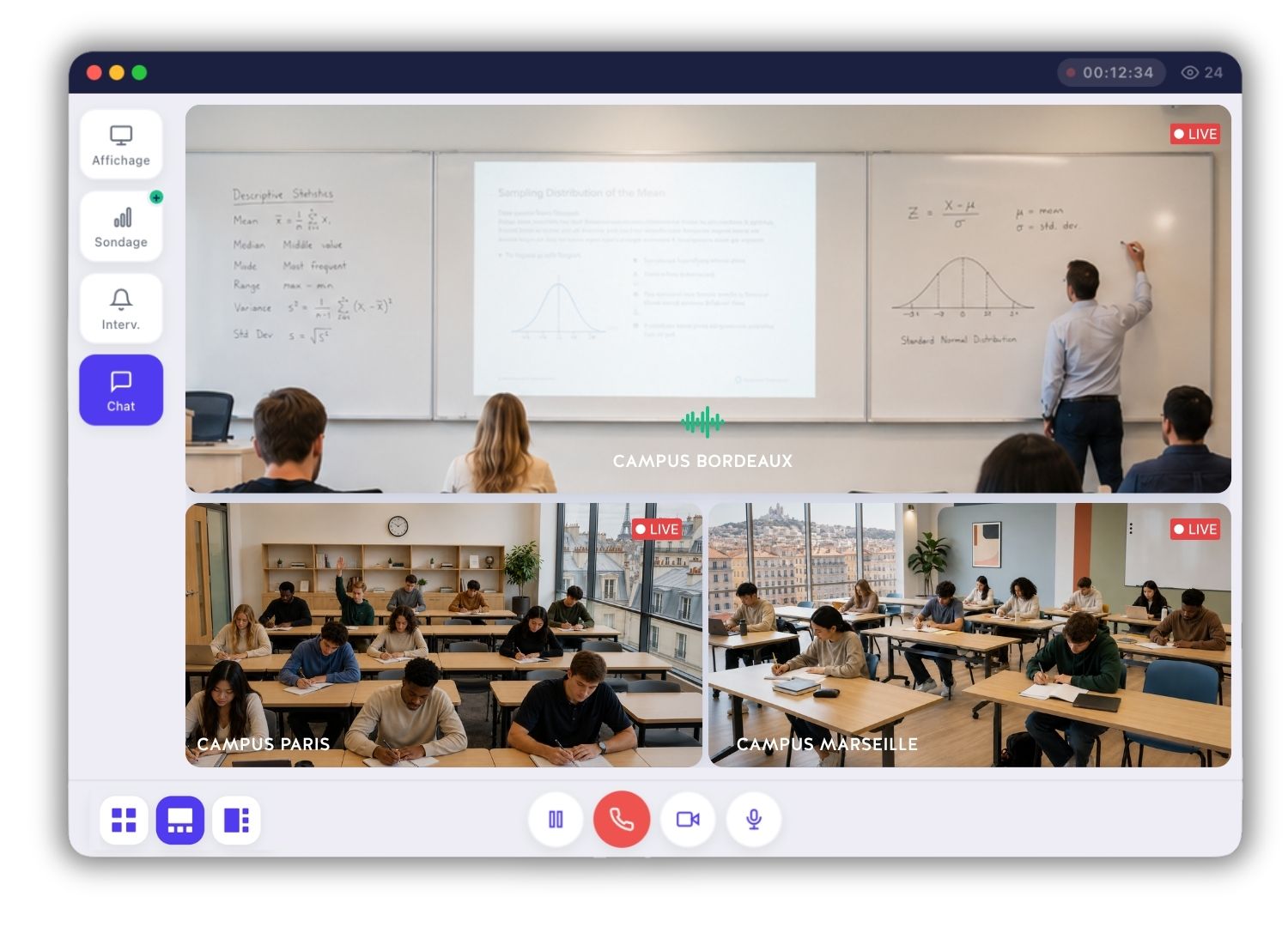
The first scenario consists of connecting classrooms so that the same class can be streamed simultaneously across several sites. An instructor teaches from one campus, while other classrooms elsewhere receive the class live. This is a powerful way to pool resources. A single instructor can therefore reach several geographically dispersed cohorts. Taken to its fullest extent, this model can open up entire regions by bringing classes to places where no instructor is available.
Record and stream classes
The second scenario is the most common. It involves capturing an in-person class and making it available remotely, live for those attending in real time and as a recording for everyone else. This format directly addresses the accessibility and flexibility needs identified during the audit. It turns each class into a lasting resource that can be viewed after the session.
Bring in experts remotely
The third scenario reverses the logic. Here, it is not the learner who is remote, but the speaker. An expert, professional or guest instructor can address your classroom without travelling. This enriches your classes with outside contributions that are rare or expensive to provide in person.
Record conferences and events
The fourth scenario goes beyond the conventional classroom setting. A HyFlex classroom can also be used to record and stream conferences, symposiums or one-off events. You expand your audience during the event and create a reusable video archive for later use.
A single institution will generally combine several of these scenarios. Once you have defined your project in these precise terms, you can confidently move on to choosing the equipment and software solution.
Choose your audiovisual equipment
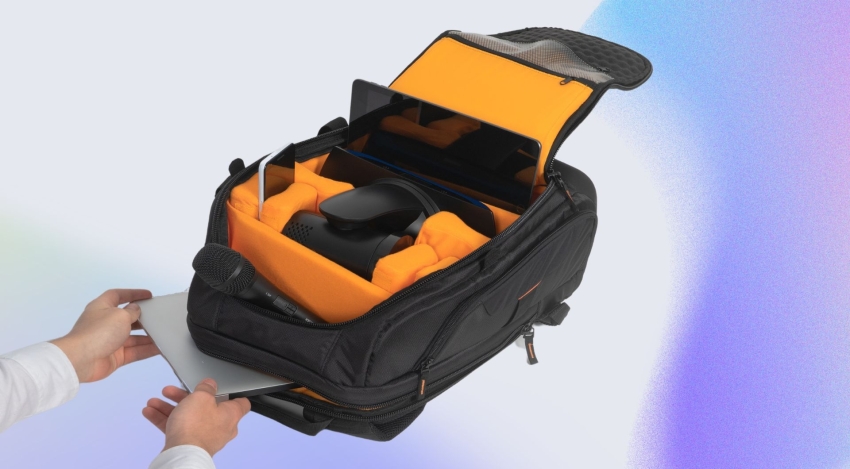
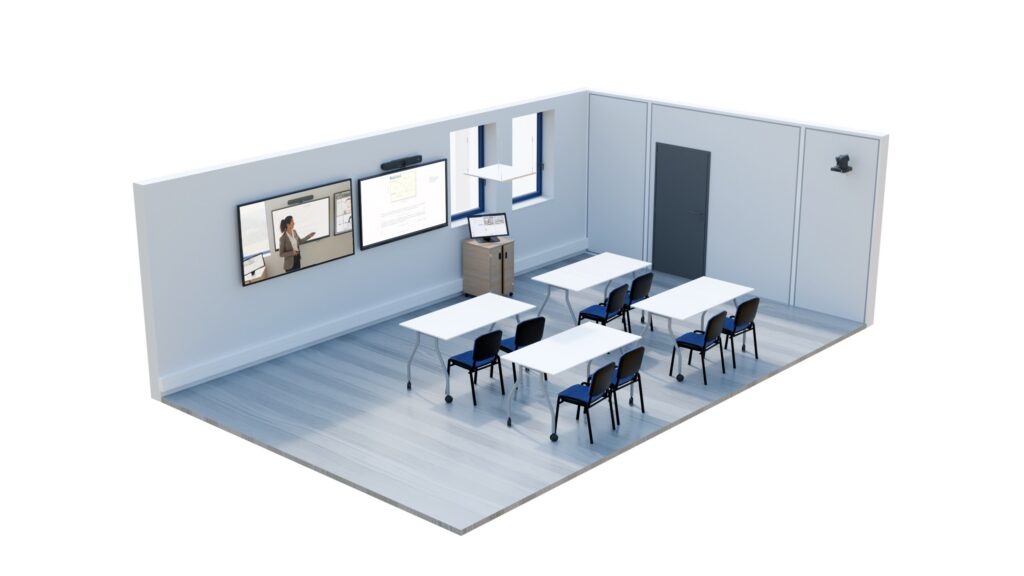
A HyFlex classroom relies on a simple equipment foundation, but it must be designed for teaching, not just videoconferencing. The distinction matters. Meeting-room equipment is designed to show faces around a table. Classroom equipment must provide a legible whiteboard, a clear voice at the back of the room and a sharp presentation. Four equipment categories form this foundation.
PTZ cameras
Pan-tilt-zoom cameras that automatically follow the instructor using motion detection. The framing adjusts in real time. The instructor can move freely without ever having to think about the camera.
Ceiling microphones
An array of ceiling microphones captures sound evenly throughout the room. Both the instructor’s voice and the students’ questions can be heard remotely. There is no lapel microphone to remember and nothing to plug in before starting.
Interactive display or projector
Replacing the conventional whiteboard with an interactive display or projector transforms the experience. Written content becomes clear and exportable. Remote learners can read the whiteboard just as well as those in the front row.
Sound system and confidence monitor
Speakers and amplification ensure clear two-way communication. A confidence monitor displays remote learners in the classroom. The instructor can see them and speak to them naturally, as though they were present.
Beyond the equipment list, one criterion determines everything: compatibility. Excellent equipment that is poorly integrated with the streaming software is a recipe for unpleasant surprises on installation day: cables that cannot communicate, unstable settings and interminable start-up times. The classic mistake is to purchase good components separately, only to find that they refuse to work together once assembled.
The solution is simple. Start with a catalogue of equipment that has already been tested with the platform you will use. You gain reliability and eliminate the trial-and-error phase at the most critical point in the project.
The platform: Kalyzée Connect
The equipment does only half the work. It is the software that orchestrates the classroom, determines what is recorded and how it is streamed, and above all shapes the learner’s remote classroom experience. Kalyzée Connect is the multi-stream recording and broadcasting platform designed for this purpose. It transforms an ordinary classroom into a HyFlex space without turning it into a television studio.
Multi-stream recording and broadcasting
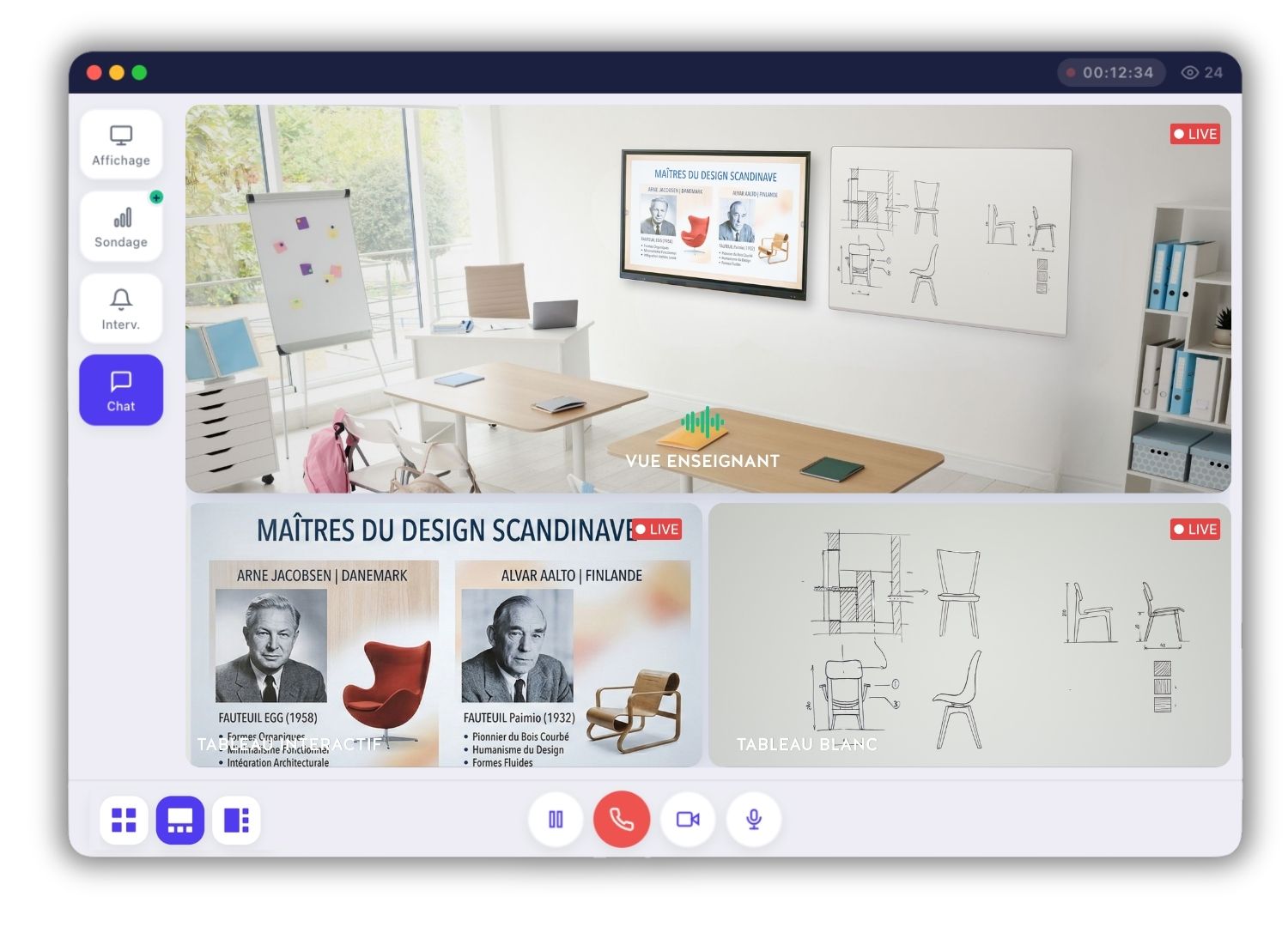
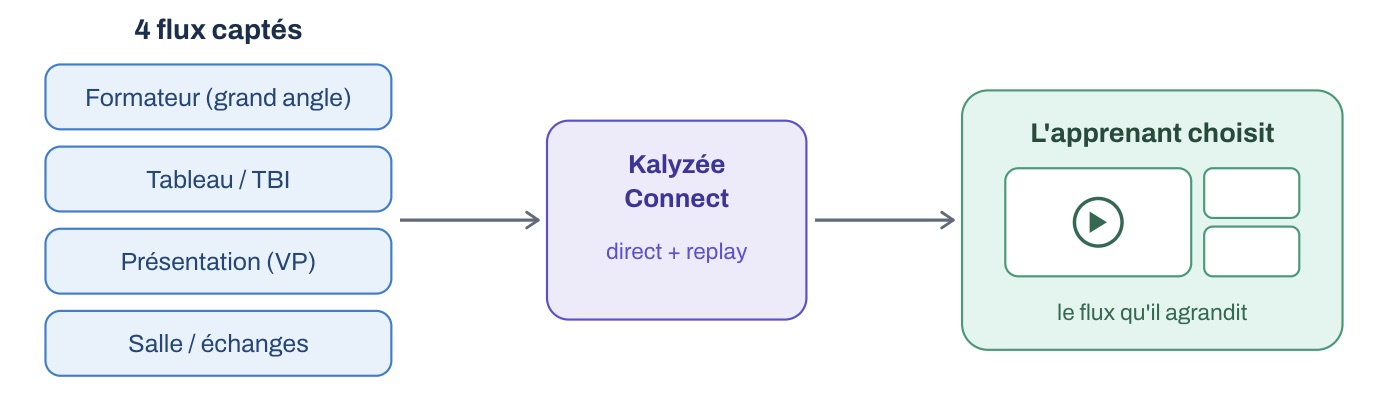
Conventional videoconferencing imposes a single image on everyone. This is its fundamental limitation for education. Kalyzée Connect works differently. The platform records several sources at once: the whiteboard, a wide-angle view of the instructor, the digital feed from the projector or interactive whiteboard, and even the classroom itself. Each source becomes a separate stream, broadcast in parallel.
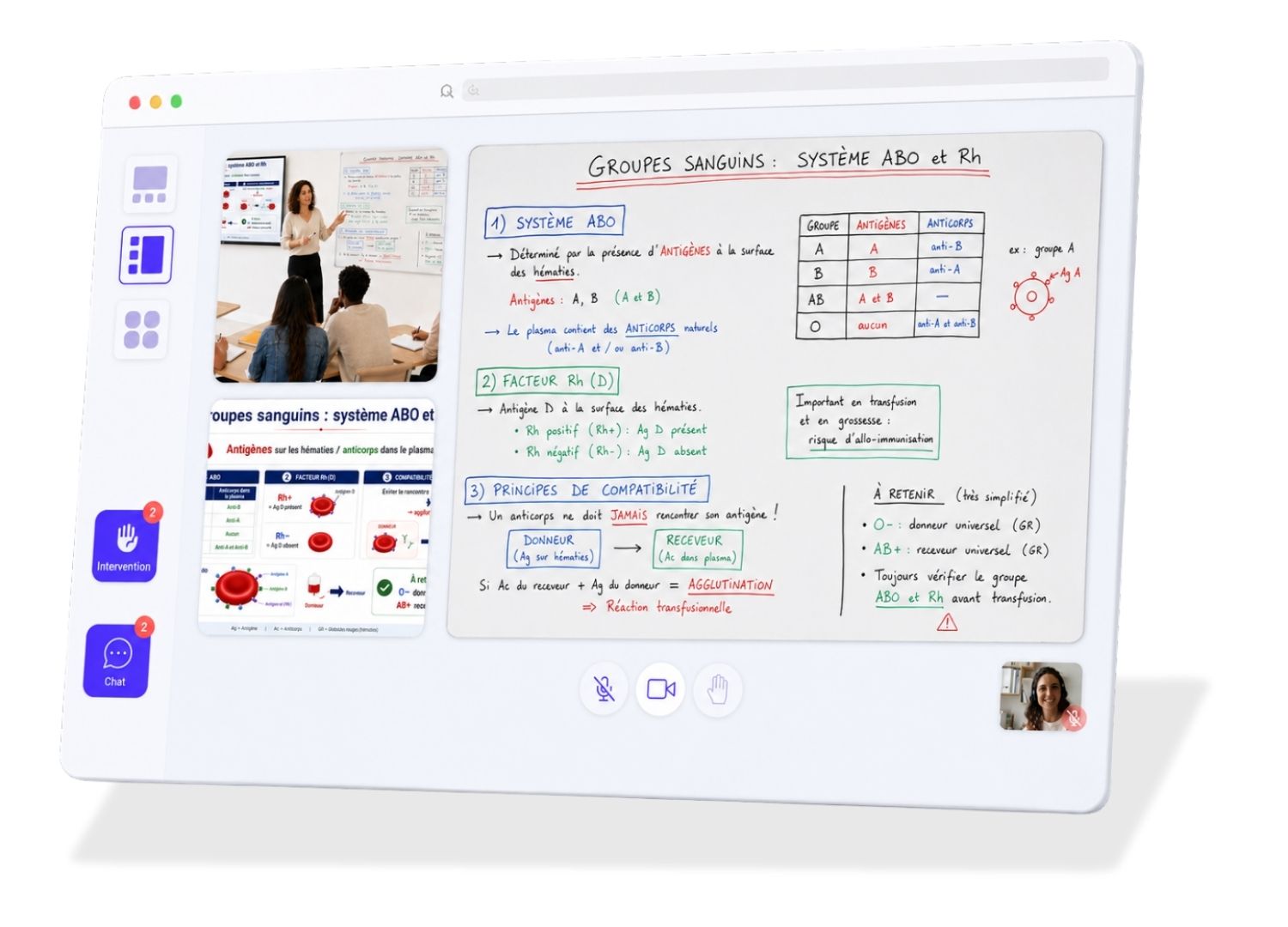
You then arrange these streams according to the type of class. Consider three real-world situations. Do you have a giant six-metre whiteboard in a large lecture theatre? Split it into two streams. The remote learner can then zoom in on the section that interests them, depending on where they are in the reasoning process. Do you run a lot of debates and discussions? Record the room so remote participants can see the questions being asked live. Do you simply have a slide and an instructor? Two streams are enough, allowing the learner to focus on what matters.
The experience is the same live and on replay. At any time, learners choose which stream to enlarge. They are no longer constrained by framing selected by a director. They compose their own view. In fact, this puts them in an even better position than the front row, since they can switch from one shot to another as they wish.
Features that make a difference every day
The strength of a HyFlex platform lies not in its list of features, but in the workload it takes off the instructor’s shoulders. Here are the five elements that transform everyday life in a Kalyzée Connect classroom.
No connections required
The platform controls all the classroom equipment, including displays, microphones and cameras. When the class begins, everything powers on and starts automatically. There is nothing to connect, no settings to adjust and no IT assistance is required to get started.
Connection to the institution’s calendar
Hybrid classes are not scheduled one by one. They are imported directly from the institution’s calendar. Each class appears on the touchscreen in its room and is automatically shared with registered learners, or with the public if you choose. The instructor arrives, taps the class and goes live.
Built-in interactivity
Polls, breakout groups and chat are available directly in the interface. Discussions remain simple and seamless. Interactivity is the same remotely and in person, avoiding the creation of a two-tier class.
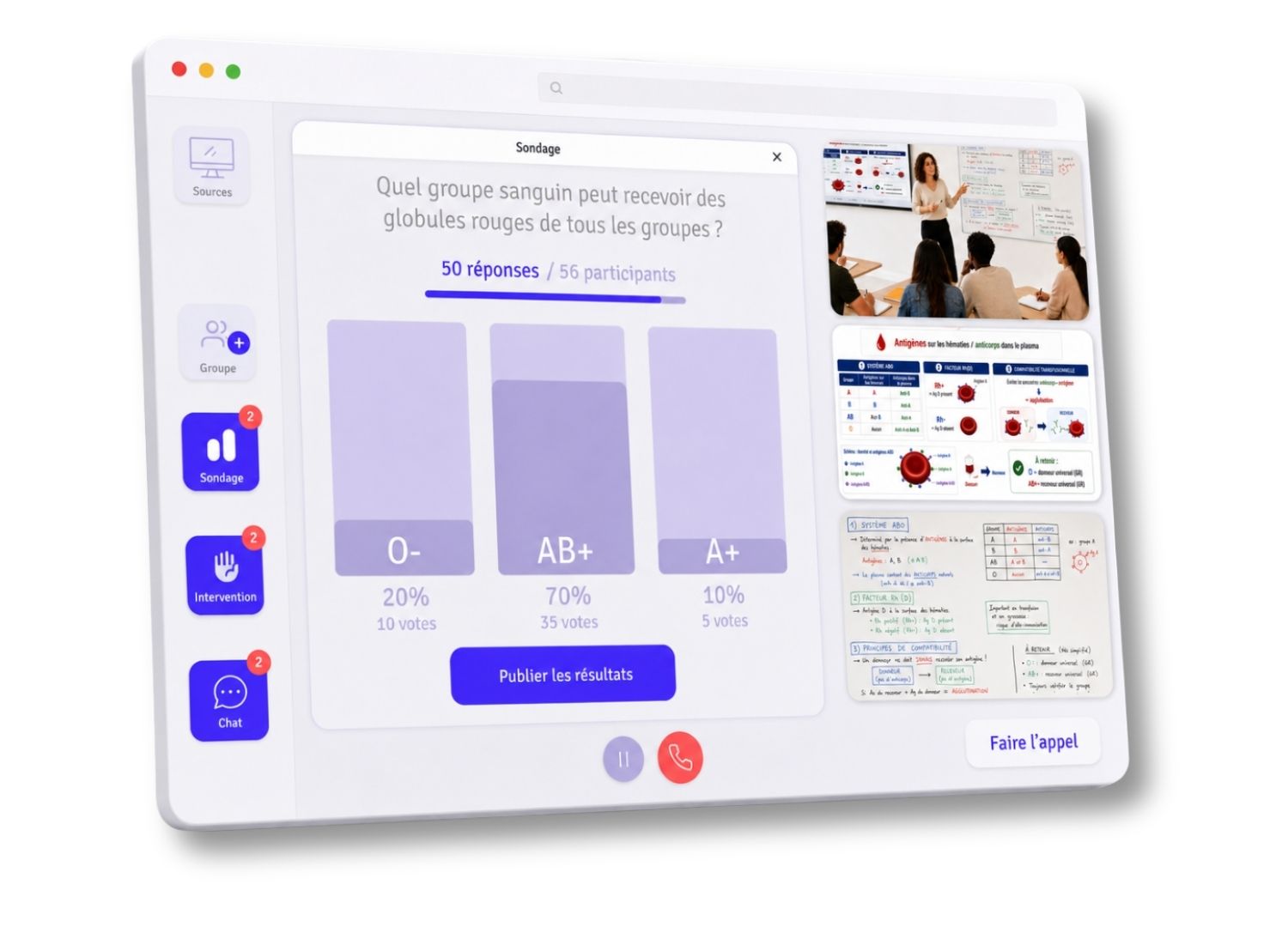
Automatic attendance tracking
Attendance is recorded without any manual action. You save considerable administrative time and have reliable evidence of participation. This directly supports Qualiopi compliance.
Remote whiteboard participation
With the instructor’s permission, a remote learner can contribute and work at the whiteboard. Their contribution is displayed either on the classroom screen or only on the instructor’s console. The remote participant becomes an active learner once again, just like those in the room.
Integration with your tools, LMS and digital learning environment
A HyFlex project often fails over one detail: the new solution does not communicate with the tools already in place, forcing teams to enter everything twice. Kalyzée Connect was designed to avoid this trap. The principle is clear: the platform enhances your LMS; it does not replace it.
In practical terms, we offer native LMS integrations (such as Moodle); where a native integration is unavailable, we develop the connector. Your recorded classes, attendance records and replays feed directly into the environment your instructors already know. Other environments connect through dedicated connectors, an open REST API and SSO or SAML authentication. Your learners retain a single point of entry, and you do not create yet another silo.
Support and customer stories
A HyFlex deployment is never simply an equipment delivery. Every institution has its own constraints, tools and culture. A successful classroom is one that has been installed, configured and tested, and that its teams have truly embraced. This is why Kalyzée supports every project from beginning to end across three areas.
The first area is custom development. The platform adapts to your specific needs, including bespoke integrations with your digital learning environment. The second is training and personalised coaching for instructors. The learning curve has deliberately been kept to a minimum: an ideal HyFlex classroom can be mastered in around one hour of training. The third is dedicated support throughout the entire period of use, with a contact who knows your project and its history.
This bespoke approach extends to our customer references. Each client has its own dedicated case study detailing the context, adaptations and results. These are not merely rows of logos, but genuine, documented projects. Here are a few examples.
ESCAET: SAMII Project
4 multimodal classrooms · Tourism school · Apprenticeship training centre
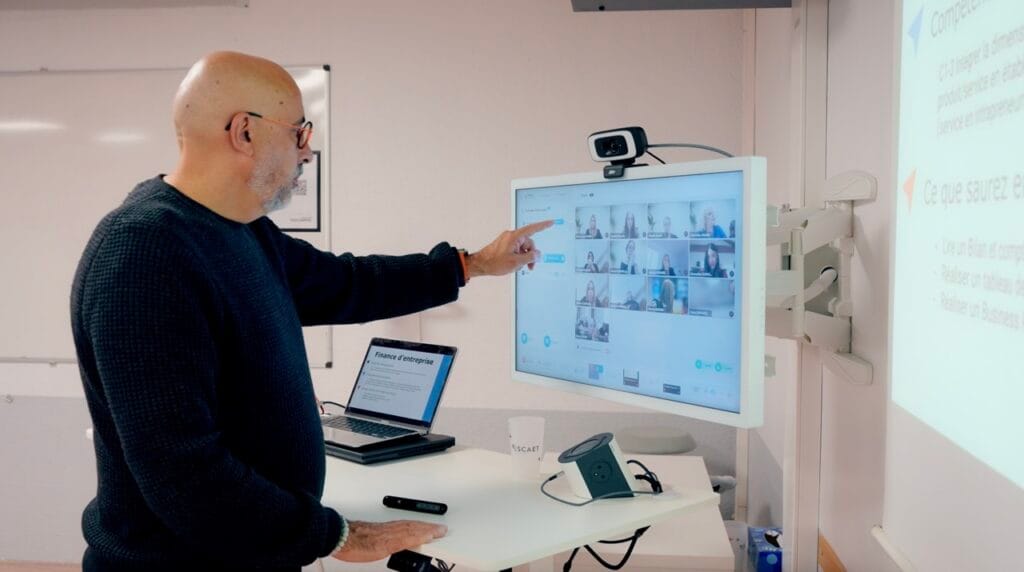
Bespoke integration with the school’s digital learning environment, automatic attendance tracking, live quizzes and centralised teaching controls for an immersive experience — delivering the same level of engagement remotely as in person.
French Guiana Education Authority: Connected French Guiana
20 HyFlex classrooms · Inclusive education · French overseas territory
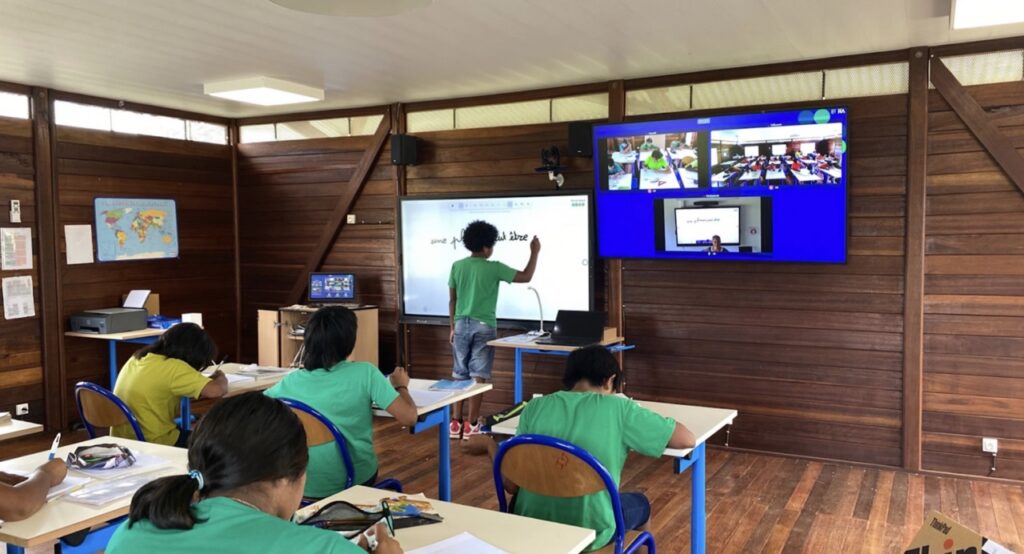
Educational continuity in isolated areas: bringing classes to schools where no instructor is available, even under extreme network and power conditions (satellite).
Budget and deployment
That leaves the question everyone asks: the budget. A persistent misconception suggests that equipping a HyFlex classroom costs a fortune. This is not true, on one condition: you must start with a proven model rather than assembling components at random, because this trial-and-error approach is what causes costs and timescales to spiral.
In terms of equipment, a HyFlex classroom costs between €5,000 and €25,000. This amount covers a fully equipped, ready-to-use classroom. It is therefore not a starting price to which countless options are added, but a coherent, pre-tested system.
The platform comes in addition to this. The Kalyzée Connect pricing model is deliberately scalable. It combines a subscription per classroom with a usage-based cost per learner that decreases with volume. An interconnection option connects several campuses.
Every project remains unique. The number of classrooms, the existing equipment to be retained and the integration requirements all affect the price. It is therefore more accurate to obtain a quote tailored to your situation than to rely on a theoretical price. A preliminary audit defines this scope precisely.
Deployment stages
A well-managed deployment always follows the same path. It begins with the audit, followed by defining the project, choosing and sizing the equipment, installing it and integrating it with existing tools, and finally training instructors before launch. Each stage builds on the previous one, avoiding costly backtracking.

Installing a HyFlex classroom begins with a clear-eyed audit of your tools, learners and instructors. This is followed by a clearly defined project, then the selection of proven equipment and a platform that makes the technology invisible while integrating with your LMS. Support takes care of the rest. From beginning to end, one principle guides the approach: make the classroom so simple that all the instructor has to do is teach.