Welcome to the exciting world of live streaming, a fast-growing field that touches a wide range of activities, from gaming to teaching, content creation, and professional uses.
Get the free ebook version of this article: the complete guide to live streaming.
LUDOVIC BOUGUERRA, STREAMING EXPERT
ROMANE TRAGIN, WRITER
Live streaming is a technique for transmitting audio and video content over the internet in real time. Unlike traditional broadcasting methods, live streaming doesn’t require the content to be fully downloaded before playback. Instead, data is transmitted as a continuous stream of data packets, which are received and decoded by the user’s device in real time.
Unlike video conferencing, this technology uses specific communication protocols, such as Real-time Transport Protocol (RTP)*, to ensure smooth, synchronized transmission. Live streaming is widely used for various purposes, including live sports events, concerts, webinars, online gaming, and live broadcasts on social media platforms.
1. UNDERSTANDING LIVE STREAMING
Live streaming refers to the real-time broadcast of audio and video content over the internet. Unlike traditional media playback, live streaming lets users watch or listen to content without downloading it in full. This technology relies on protocols such as Real-time Transport Protocol (RTP)*, which deliver data as a continuous stream and allow for instant playback.
Protocols involved: Live streaming uses specific protocols to ensure smooth, synchronized data delivery. The most common are RTMP, as well as HTTP Live Streaming (HLS) and MPEG-DASH. These protocols handle data packet transmission, error correction, and make sure content is broadcast with no significant delay.
Differences between live streaming and on-demand streaming: Unlike on-demand streaming, where content is stored on a server and accessible at any time, live streaming happens in real time. There’s no content storage, and users need to connect to a specific stream to access the broadcast content.
A few key terms to get started:
*Live Streaming: Real-time broadcasting of audio and video content over the internet, with no prior full download.
*Real-time Transport Protocol (RTP): A standard internet protocol used for the continuous transmission of audio and video data in real time.
*Streaming Platform: A service or app where live streaming can be hosted and watched. Popular examples include Twitch, YouTube Live, and Facebook Live.
*Webinar: An online seminar broadcast live over the internet. Typically used for educational presentations, product demos, or group discussions.
*Encoding: The process of converting audio and video data into a format suited for streaming.
*Bitrate: The data transmission rate in streaming. A higher bitrate generally means better quality, but requires a faster internet connection.
*Latency: The delay between the moment content is broadcast and the moment it’s received by viewers. Low latency is preferable for real-time interaction.
*VOD (Video on Demand): The ability to watch recorded videos at any time, as opposed to live streaming where content is broadcast in real time.
*Overlay: Graphics or images added over the main video in a live stream, often used to show extra information or customize the stream’s appearance.
2. EQUIPMENT NEEDED FOR LIVE STREAMING
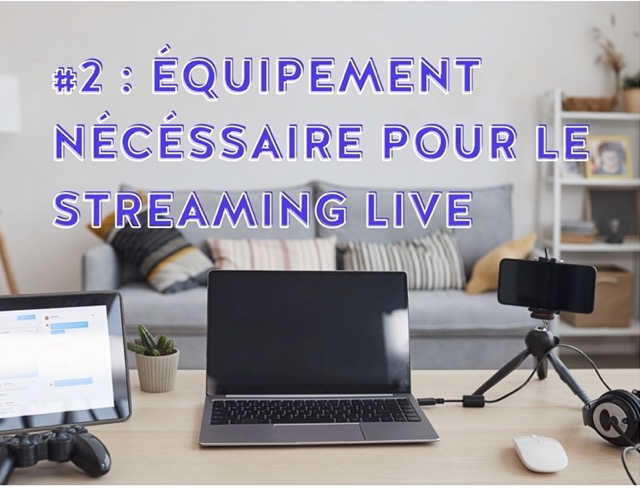
In this section, we cover the essential equipment for any streamer: quality cameras and microphones, a capable computer with suitable streaming software, and lighting and backgrounds for an appealing visual setup. We’ll guide you through the fundamental choices to get started with streaming. On the next pages, find the equipment you need depending on how you plan to use live streaming.
Camera/Webcam:
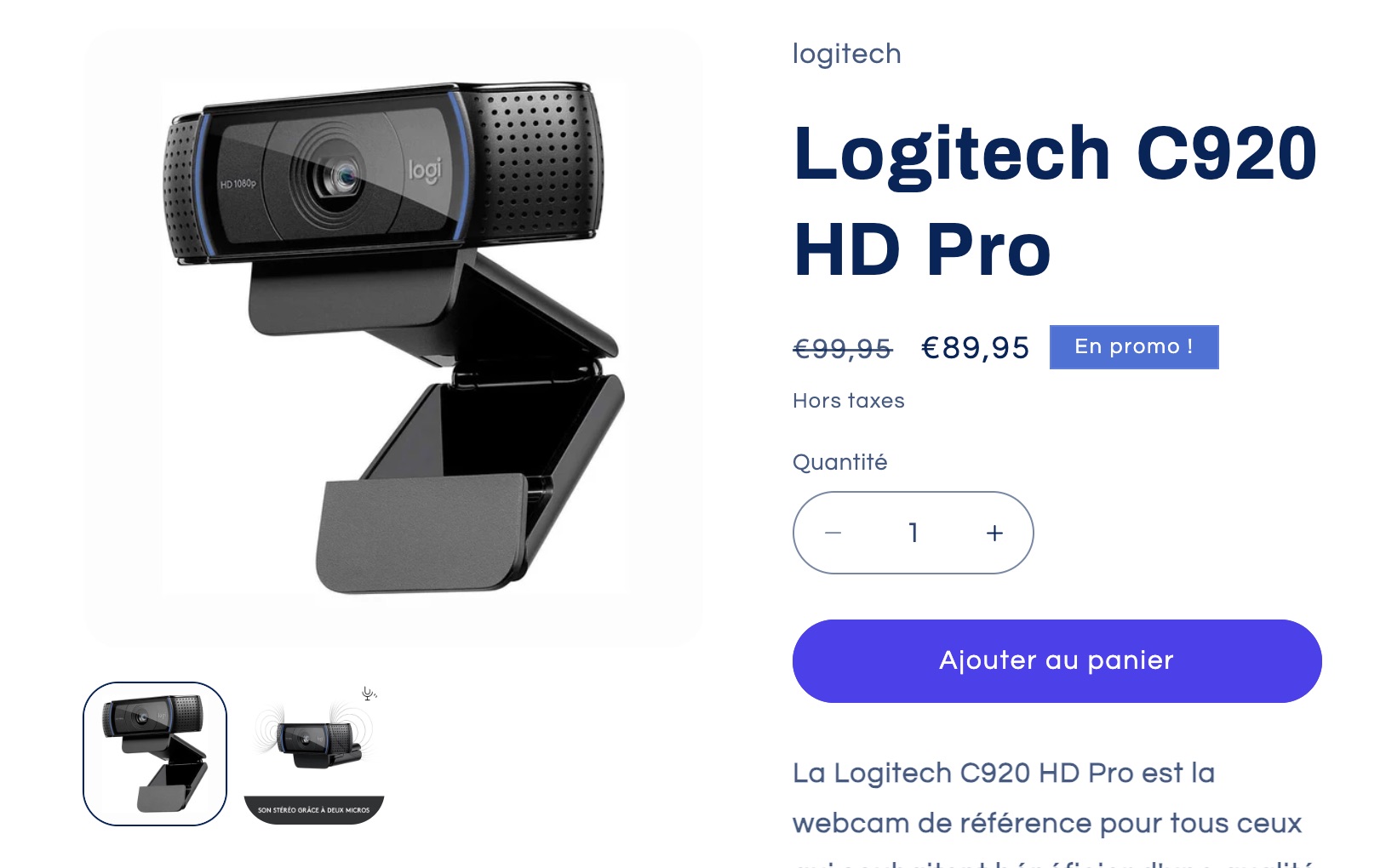
Good image quality is crucial. For beginners, an HD webcam like the Logitech C920 is an excellent choice. For higher quality, consider a DSLR or mirrorless camera. You can also stream directly from your smartphone to YouTube, with no subscriber restrictions, using the Kast Live app.
Microphone:
Sound clarity is essential. A USB microphone such as the Blue Yeti desk mic is ideal for getting started. For professional-grade audio, go with an XLR microphone. If you choose the XLR option, you’ll need an audio interface, which acts as a bridge between your mic and your computer. We recommend reading this article if you’d like more detail on choosing a streaming microphone.
Network:
For successful live streaming, it’s crucial to choose a resolution suited to your internet connection, starting by testing your upload speed. You also need to correctly set your encoder’s parameters, including resolution, frame rate, and bitrate. Some platforms automatically adapt your broadcast for different output formats, optimizing stream quality and latency.
Computer:
A powerful PC or Mac, capable of handling streaming and video processing. Make sure your machine has enough RAM (at least 8GB) and a solid processor (such as an Intel Core i5 or better). Video encoding is very resource-intensive; if your processor isn’t powerful enough, you can get dedicated hardware encoding equipment.
Lighting:
Good lighting is essential for improving visual quality. Desk lamps or LED panels can be enough to get started.
Background and environment:
A neutral background or a green screen for custom backdrops. Also make sure you have a quiet, well-organized space.
Capture card:
This is needed if you’re using a software encoder. A capture card is a device that transfers video from your camera to your streaming setup.
The all-in-one option:
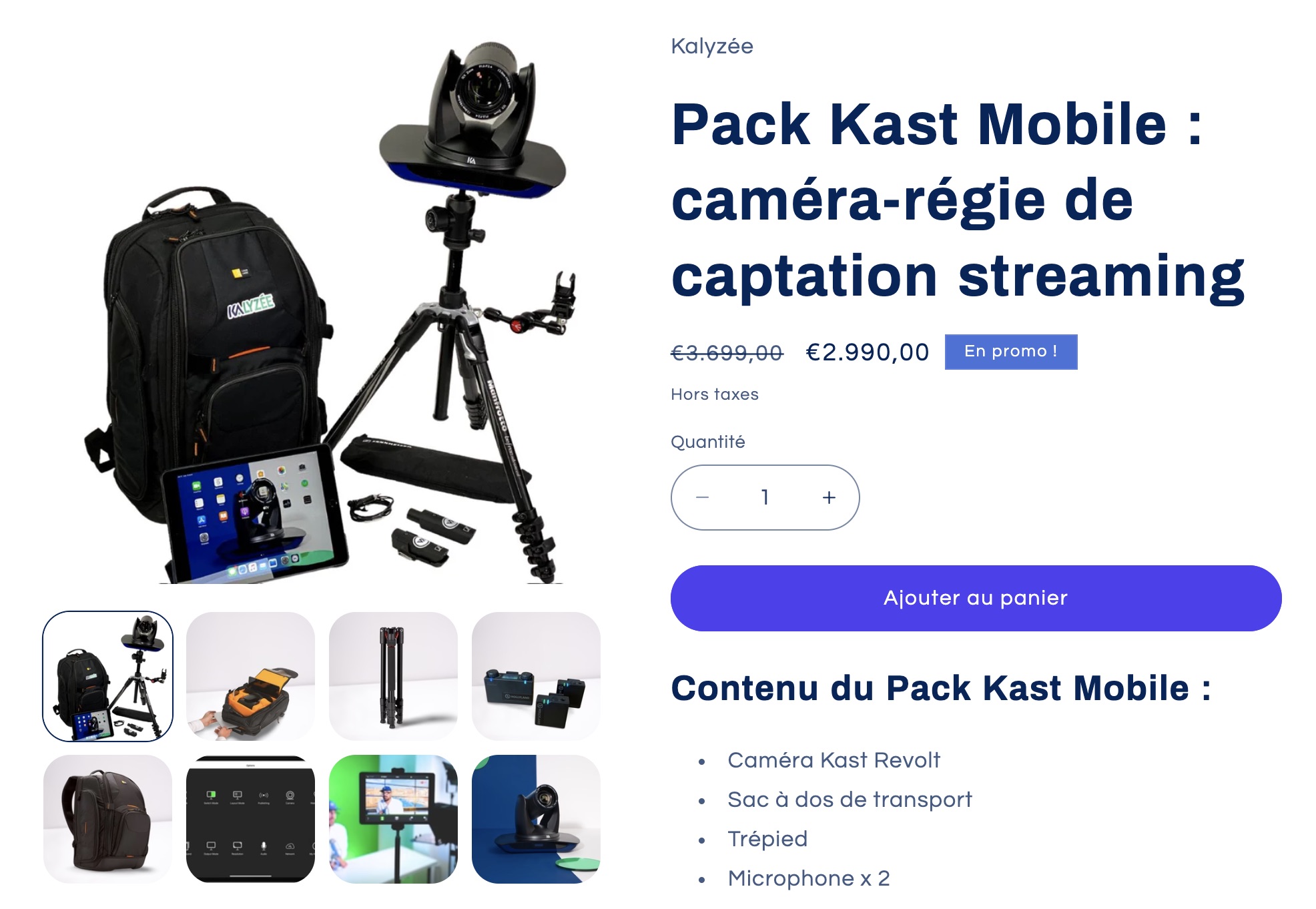
Kalyzée offers a single camera with its own built-in audiovisual control unit — a standout feature in this space.
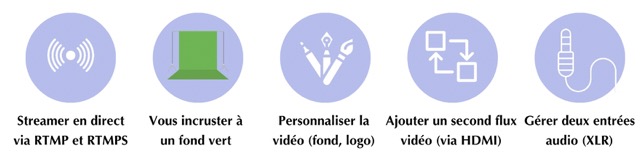
This camera enables live streaming with no additional equipment, even supporting a dual audiovisual feed. This lets you broadcast two feeds simultaneously across various streaming platforms using the RTMP and RTMPS protocols.
The camera also includes a green-screen option. For a complete solution, the camera is offered as a kit including all the accessories needed for capture, such as a microphone, a tripod, and an iPad, all packed into a backpack designed for unrestricted mobility.
STREAMING FOR TEACHING
Online teaching is growing in popularity, and we’ll help you choose the right equipment for your online classes and webinars, including interactive boards and other digital teaching tools.
Equipment for broadcasting from a classroom:
In a hybrid class, a simple video call with a computer webcam isn’t enough. It’s important to ensure remote learners get good visibility and flawless audio quality.
Camera, document camera:
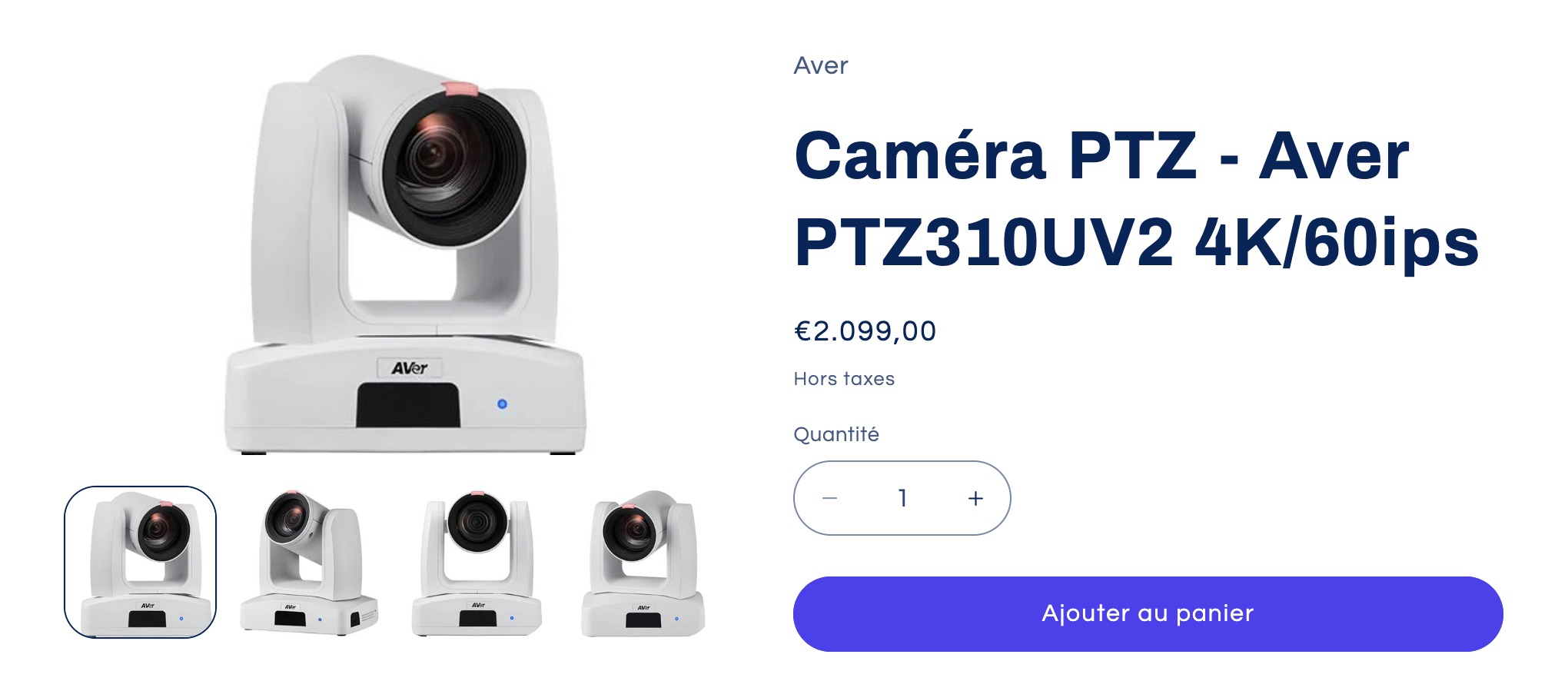
Many institutions have equipped their classrooms and lecture halls with room cameras. PTZ cameras are often the favorite, such as the Aver PTZ310UV2 camera, or a wide-angle camera like the VB350. For lab sessions, it can be useful to add a document camera to film more technical, precise gestures, such as those in the ELMO range.
Sound system:
Still on the subject of room equipment, the recommended option is a Shure or Sennheiser ceiling tile microphone, with perfect acoustics that reduce background noise. For smaller budgets, we recommend handheld or XLR lapel microphones.
Interactive board and teaching tools:
Add projectors or interactive boards to share excellent-quality digital content remotely. Using an interactive board also lets you integrate tools such as the Kalyzée whiteboard app, to share a collaborative whiteboard* during your training stream.
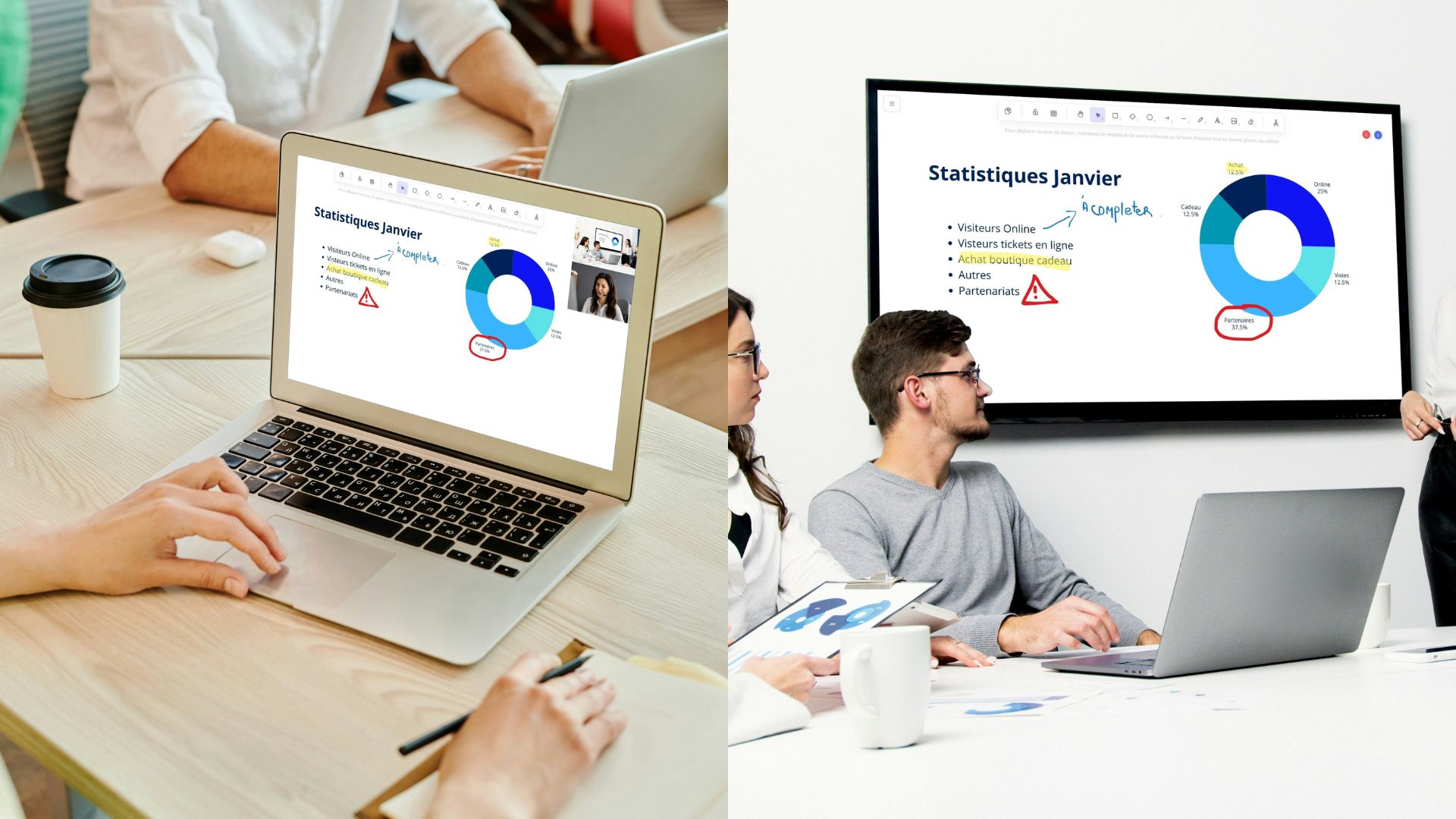
* If your IWB doesn’t have access to the Android Play Store, you can download the app directly via its APK here
Streaming software suited to education:
Use platforms that offer teaching-friendly features, such as screen sharing, interactive whiteboards, and breakout rooms. Favor sovereign, data-respectful solutions such as Big Blue Button or Kalyzée’s Kapture.
Digital resources:
Prepare digital resources such as PDFs, slides, and videos to support your teaching. To go further with online teaching, consider interactive videos, quizzes, polls, and more.
STREAMING FOR PROFESSIONALS

For professionals, streaming is a powerful communication tool. It supports conferences, virtual presentations, and online seminars, offering an opportunity to boost visibility, share information, and reach a wide audience.
Quality audiovisual equipment:
Invest in an HD webcam such as the Logitech C920 and a professional microphone (such as a Sennheiser or Shure) to ensure flawless audio and video quality. You can also opt for an all-in-one studio, including camera, microphone, and even an app to stream with the Kast Revolt Kit.
Webinar and conferencing software:
Use platforms such as Zoom, Microsoft Teams, GoTo Webinar, or Kalyzée’s Kapture, which offer features suited to professional needs, including screen sharing, recording, and participant management.
Presentation tools:
PowerPoint or Canva are popular choices for creating visually appealing presentations. Make sure to integrate them smoothly into your stream.
Professional lighting:
Proper lighting is essential. Options such as Neewer LED panels provide even, quality lighting.
A clean background:
Choose a neutral background or use a green screen to overlay a more formal virtual environment.
SPECIFIC SETUP FOR GAMERS
Streaming games requires specific equipment. Here, we cover capture cards, PCs, processors, graphics cards, and other specific hardware to enhance your gaming broadcasts. We’ll cover streaming software and platforms in the following sections of the guide.
Capture cards:
Essential for streamers using consoles like the PlayStation or Xbox. Models such as the Elgato Game Capture HD60S+ or the AverMedia Live Gamer Mini are popular for their reliability and image quality.
Gaming PC:
A powerful PC with a fast processor (such as an Intel i7 or AMD Ryzen 7) and a good graphics card (such as an NVIDIA RTX 2060) is crucial for streaming and gaming at the same time.
Headsets and Microphones:
A good headset with a mic, such as the HyperX Cloud II, ensures clear communication with your audience. For higher audio quality, consider a separate microphone. You have two options: USB for simplicity, or XLR for superior sound quality.
Lighting and background:
The visual quality of your streams doesn’t depend on the camera alone. Use a good lighting setup, with LED lamps such as the Elgato Key Light. If you want to blend into the set, consider a green screen to add custom backgrounds to your stream, although some cameras and software can do this without one.
Camera:
Use a good-quality webcam, such as the Logitech C922, to show your reactions while gaming.
CONTENT CREATORS AND VLOGGERS

This section is dedicated to content creators and vloggers, focusing on cameras and microphones suited to creating varied content.
Smartphone vs. dedicated camera:
Recent smartphones, paired with a few accessories such as a stabilizer, an external lens, and a microphone, can be more than enough for live streaming. Using a dedicated camera will improve image quality, but will make broadcasting considerably more complicated, especially while on the move.
How do you live stream on YouTube without 1,000 subscribers on your account? Find out here!
Studio-quality microphone:
Sound quality is essential, and a smartphone’s built-in mic isn’t enough. It’s worth considering a wireless lapel mic to improve the audio quality of your recordings — for example, the wireless Rode Wireless lapel mics.
Professional lighting:
Lighting has a major impact on visual quality. LED panels, such as the Elgato Key Light, provide clear, consistent lighting, crucial for live streams.
Stabilization accessories:
For mobile vlogging, a stabilizer such as the DJI Ronin-SC is ideal for keeping the camera steady while moving.
3. LIVE DIRECTING SOFTWARE
In this chapter, we explore the essential software for running your live streams successfully. Whether you’re a beginner or experienced streamer, choosing the right streaming software is crucial for a smooth, professional broadcast. We’ll look at a variety of software, from free options to more advanced paid solutions, focusing on their features, ease of use, and compatibility with various equipment.
To learn all the details on the 10 best live-streaming production software options, head over to this dedicated article.
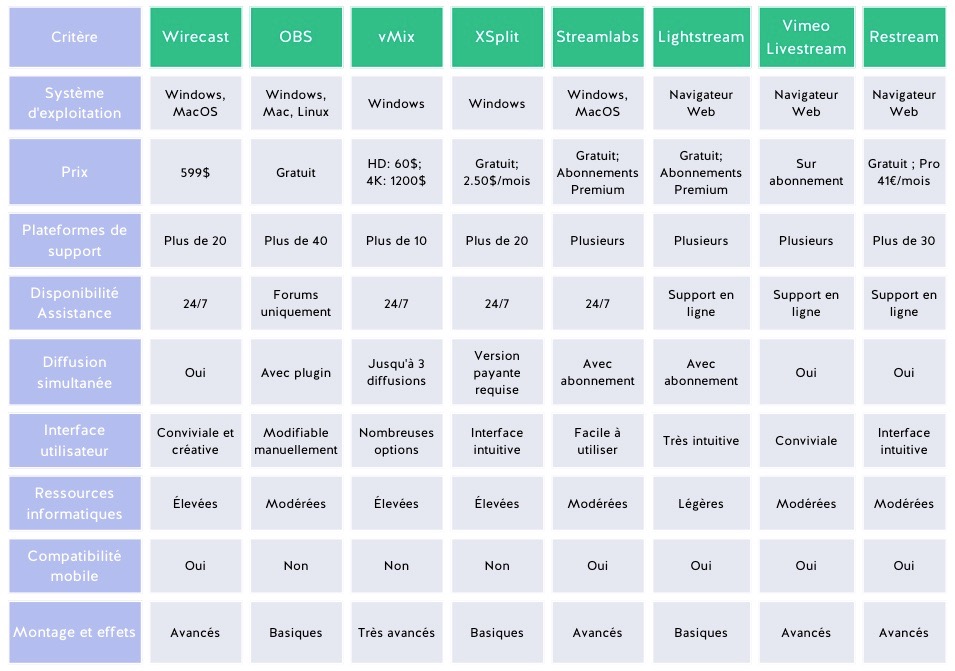
These streaming software options are just a few of the many available to content creators. The final choice depends on your specific needs, since each solution has its own strengths and weaknesses. It’s recommended to do thorough research and experiment with each one to find the option that best matches your requirements.
Be sure to distinguish directing software used for live streaming from the platforms on which the content is broadcast. In the fifth section of our guide, we’ll explore the different broadcasting platforms suited to your specific use of live streaming, to help you identify the one that best meets your needs.
4. OPTIMAL AUDIO AND VIDEO QUALITY
This section will guide you through improving the visual and audio clarity of your broadcast, focusing on choosing the right equipment, adjusting technical settings, and following recommended practices to ensure an immersive, professional streaming experience for your audience.
Image:
Camera/Webcam: Good image quality is crucial. As mentioned earlier, for higher image quality, consider a DSLR or mirrorless camera, which will need to be paired with a video controller such as a Black Magic, for example, to capture the live feed and stream it.
Efficient streaming software: Reduce resource usage by using reliable, lightweight streaming software for better management of your video and audio stream.
Sound:
Reducing background noise: Minimize background noise by using directional microphones and optimizing the room’s acoustics. Do your streams in a room filled with rugs, blankets, and fabric, which absorb sound. The less your room tends to echo, the better your audio will be.
XLR microphone: To improve the sound quality of your streams, you can get an XLR microphone and a suitable audio interface.
Hardware encoding offers several advantages for streaming:
Hardware encoding is often more efficient than software encoding because it uses specialized components (such as graphics cards) for video processing. This frees up the central processor (CPU) up for other tasks. Since encoding is handled by dedicated hardware, there’s often less risk of crashes or software issues that could hurt stream quality. Finally, hardware encoding can reduce broadcast latency, an important factor for interactive streams such as live gaming.
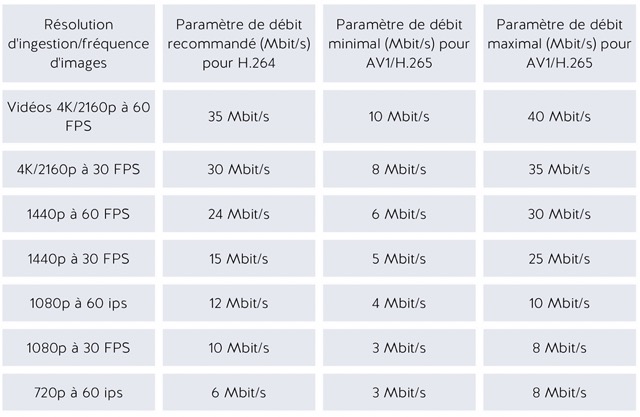
Encoder settings:
Adjust the encoder settings to balance quality and smoothness of the stream, based on available bandwidth. Recommended bitrate ranges are based on the video ingest codec, video ingest resolution, and frame rate. Here’s a table to guide you:
5. LIVE STREAMING PLATFORMS
Kalyzée has put together a list of the various broadcasting and video-hosting platforms currently on the market. Choose the platform that best matches your use of live streaming, as well as your budget. Platforms also offer different features, such as chat, comments, monetization, and more, which are worth taking into account.
If you’re using third-party live directing software, check its compatibility with your broadcasting platform. Generally, integrating the two is very simple, done through a stream key and a URL entered into your directing software.
KALTURA – For education
Kaltura, a platform designed to meet the needs of educational institutions and businesses, specializes in managing and streaming video content. It lets users create, manage, and broadcast interactive content, fostering engagement and collaboration. Known for its flexibility and easy integration with various educational and professional systems, Kaltura offers advanced features such as audience analytics, content customization, and robust security options, making the platform ideal for educational and corporate use.
VIMEO – For professionals
Vimeo is a premium, paid broadcasting platform. It’s ideal for professional creators and businesses, offering advanced features for hosting, sharing, and selling videos. Vimeo stands out for its superior broadcast quality and extensive customization options.
TWITCH – For gamers
Twitch, a platform owned by Amazon, specializes in live streaming, particularly for video games. It gives streamers the ability to interact with their audience in real time, and is known for its engaged community and interactive features, including live chat and paid subscriptions.
KAPTURE – For education and professionals
Kapture is the broadcasting platform offered by Kalyzée. Specially designed for training, it lets professionals and teachers broadcast training sessions and interact with their audience. Its advantage? Unmatched simplicity. Unlike typical online platforms, Kapture integrates fully with training environments, such as classrooms, lecture halls, and more. To learn more about the Kapture platform, click here!
YOUTUBE – For content creators and professionals
YouTube, Google’s video broadcasting giant, is the go-to platform for reaching a wide audience. It lets creators of all kinds publish content for free, with monetization options and an immense global reach. Its strength lies in its ease of access and massive community.
POD – For education
POD is an open-source university video hosting platform, widely used in higher education. This free platform still requires technical configuration skills to implement.
6. INTERACTING WITH YOUR AUDIENCE
Each platform offers a unique range of features, such as the ability to interact live with your audience through chat, comments, monetization options, and much more. It’s essential to choose the platform that not only fits your financial expectations, but also gives you the tools you need for the best possible interaction with your audience.
Live chat:
Going live means giving your audience a chance to talk with you. This lets viewers take an active part, creating a more immersive, interactive experience. Creators can receive and respond to comments in real time, leading to a better understanding of audience preferences. Chats can also be used for donations or paid features, such as Super Chats on YouTube.
Polls and Q&A:
Polls and Q&A sessions during live streams boost engagement and provide valuable feedback, while making viewers feel more involved. For example, on Twitch or YouTube Live, a streamer might use polls to decide on upcoming content or run a Q&A to interact directly with their audience.
Guests and co-hosting:
These methods make it possible to share expert knowledge, discuss industry trends, or co-host interactive training sessions. This fosters idea sharing, networking, and continuous learning within the professional community.
Analytics and feedback features:
Important for professionals and content creators to assess engagement on YouTube Live and Facebook Live, for example.
Broadcasting on several platforms at once (Multistreaming):
Used by content creators and professionals to reach a wider audience via Restream and similar platforms.
Screen sharing:
Essential for educational webinars and professional presentations on platforms like Zoom or Teams.
Reactions and emojis:
Popular for general engagement on social networks like Facebook, TikTok, or Instagram.
Video and multimedia sharing:
Used in teaching and corporate presentations on platforms like Vimeo Livestream, Kapture, and Kaltura.
7. MONETIZATION AND MARKETING

Monetizing and marketing live-streaming videos are crucial aspects for content creators looking to generate revenue from their broadcasts. Here are some concrete examples of strategies and platforms for monetizing streaming videos:
Twitch:
Originally focused on video games, this platform lets creators broadcast a variety of live content, from games to podcasts and concerts. Monetization on Twitch can happen through paid subscriptions, viewer donations, or brand partnerships. For example, the NBA used Twitch for its “That’s Game” campaign, partnering with Twitch creators for sponsored, customized broadcasts.
Thinkific:
Specially designed for online educators, this platform lets creators sell courses and webinars in video form. It offers the ability to schedule content release (drip content) at specific times, as well as building communities so learners can collaborate. Thinkific also offers live classes as part of its premium plan.
Social networks:
Facebook Live: Offers monetization tools such as ads during live videos and “Stars” for creators with a large audience.
Instagram Live: Ideal for real-time interaction with followers, and offers opportunities for brand partnerships.
TikTok: Although newer, it’s growing in popularity for live streaming, offering monetization options such as virtual gifts.
Monetization techniques:
Beyond the platform examples mentioned, here are various ways to monetize a live video. That said, keep in mind that the key to generating revenue from videos is engaging and growing your audience. An interested, loyal community is the essential foundation for successfully monetizing your live content.
Partnerships and sponsorships:
Working with brands to promote their products or services in your videos.
Ads:
Earn ad revenue by letting platforms run ads in your videos (such as the YouTube Partner Program: for a video to be monetizable, in addition to 10,000 views, the channel now needs at least 1,000 subscribers, as well as 4,000 cumulative watch hours over the past 12 months).
Exclusive content and subscriptions:
Offering exclusive content or special perks to paying subscribers, or built-in features on certain platforms.
Selling products or services:
Using your videos to sell your own products or services, such as merchandise, online courses, or consultations.
Affiliate marketing:
Earning commissions by promoting other companies’ products or services and providing affiliate links.
8. GOING FURTHER: AI

Going further, integrating artificial intelligence (AI) into live streaming opens up a range of possibilities for improving video and audio quality, as well as offering innovative features such as voice changing or dynamic lighting adjustment. AI can also help analyze viewer behavior in real time, letting creators better understand and engage their audience. By making use of these technological advances, streamers can not only improve the viewing experience but also discover new ways to monetize their content.
Improving video quality:
AI can optimize video resolution and quality in real time, or even alter your face, live. These AI-driven improvements make it possible to broadcast higher-quality content, or simply to stay anonymous during a stream.
Live captioning, translation, voice changing:
AI can generate live captions and translate content for an international audience. Several programs also let you stream modified audio, for example to change your voice.
Audience analysis:
Using AI to analyze viewer behavior and provide insights into engagement.
Virtual assistants:
AI chatbots can interact with the audience, answer frequently asked questions, and help with moderation.
Content generation:
AI can help create interactive graphics, data visualizations, or even generate live responses based on the streaming context.
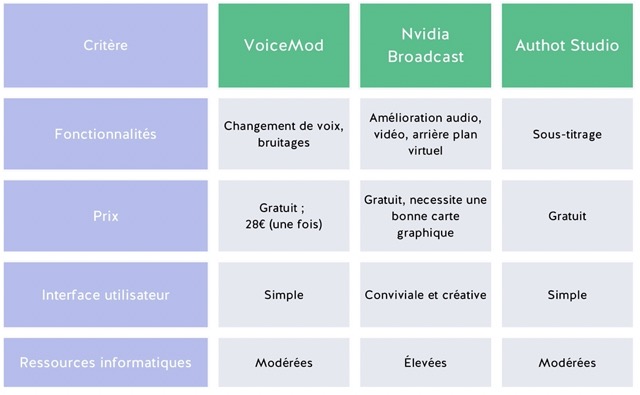
Software that processes audio and video creates virtual microphones and webcams on your computer, usable in any directing or video-calling software.
Here’s a selection of software you can use during your live streams. Artificial intelligence lets you make live changes to your voice, face, and image quality, as well as add captioning, translation, summaries, and more. Here’s a small selection of software:
9. LIVE STREAMING WITH KALYZÉE
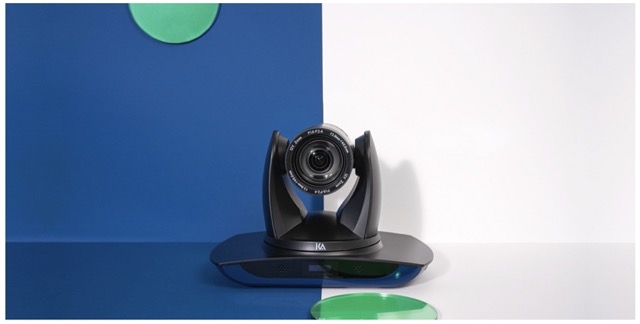
Since 2014, Kalyzée has been the French expert in audiovisual technology, mainly in the training sector. Our solutions, originally designed for teachers, offer unmatched ease of use in the world of live streaming. From capture equipment to the broadcasting platform, we manage the entire production chain of your live streams.
LIVE STREAMING CAMERA CONTROL UNIT
To stream live video easily, without using directing software or a powerful computer, Kalyzée offers the Kast Revolt camera control unit.
This one-of-a-kind camera lets you stream video content live directly from the camera’s iPad control interface, thanks to its built-in control system.
Kast mobile pack contents:

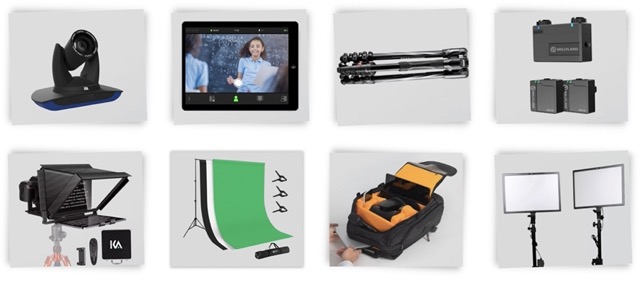
One camera control unit (Kalyzée), one control tablet (Apple), two lapel microphones (Hollyland), one tripod (Manfrotto), one teleprompter (Kalyzée), one green screen, two lights with their stands, one padded carrying backpack
All-in-one, Kast is controlled via an iPad app and lets you:
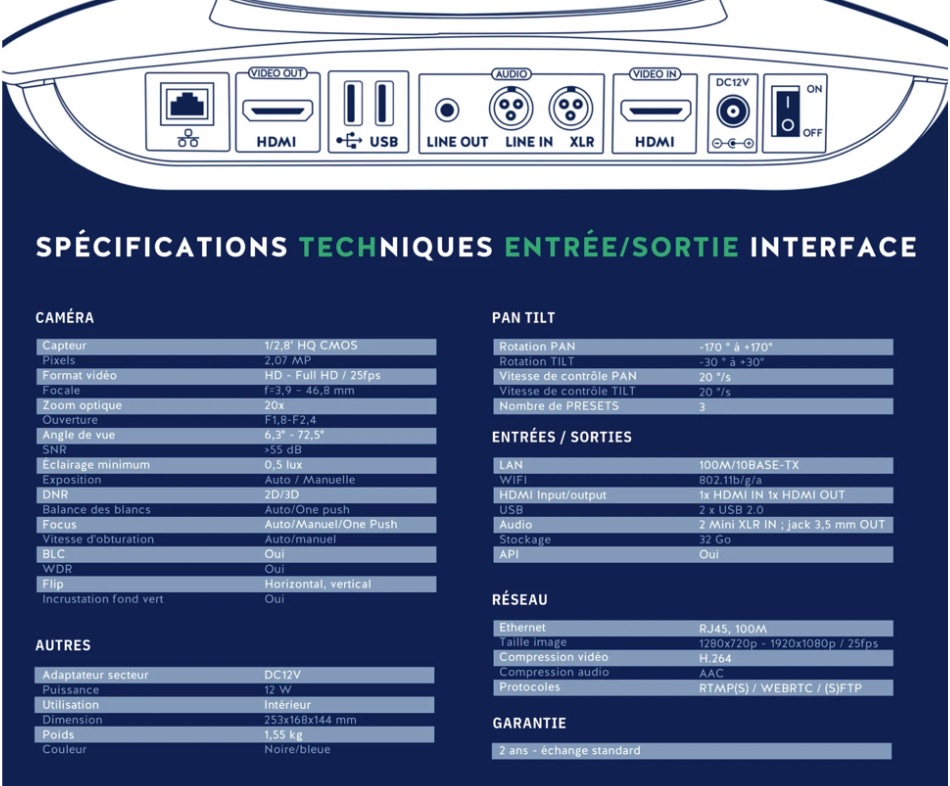
Kast spec sheet:
Going further with Kalyzée
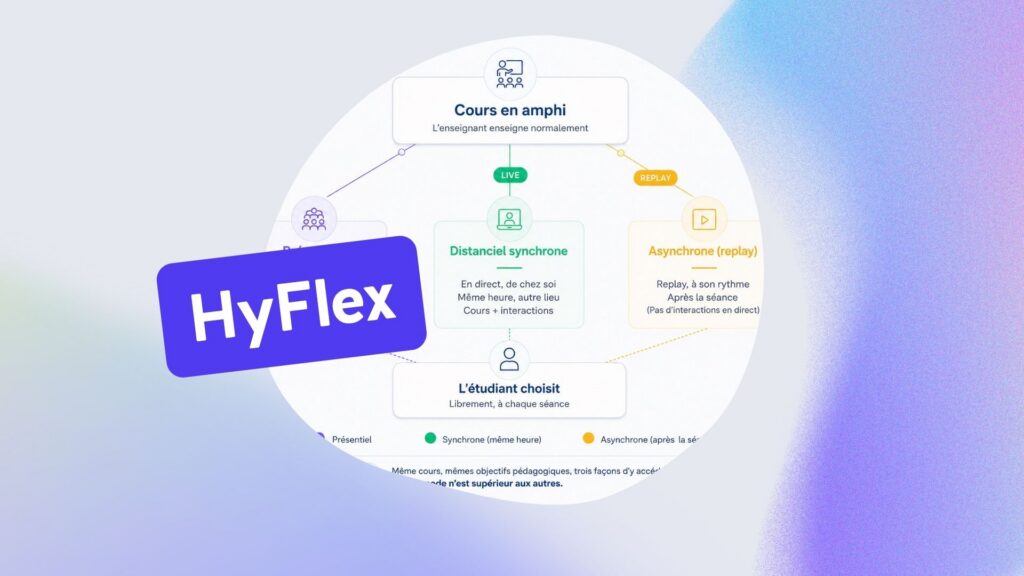
Kalyzée is a French EdTech company specializing in designing hardware and software audiovisual solutions for capturing and broadcasting training content, webinars, and conferences. Beyond our camera control unit, we offer a streaming platform dedicated to the education sector. We support our clients in designing and integrating HyFlex and hybrid classrooms, fully automated and interconnected so they can broadcast their training sessions live.
Get the free ebook version of this article: the complete guide to live streaming.