A synchronous remote class is a class where knowledge is delivered and exchanges between the teacher and learners happen in real time, at a scheduled time, through a remote communication tool (virtual classroom, video conferencing, webinar). All participants are connected at the same time, without being in the same place.
It’s the format that most closely resembles an in-person class, except the room no longer has walls. In this article, we’ll define exactly what a synchronous class is, distinguish it from asynchronous and HyFlex formats (two concepts it’s often confused with), detail its benefits and limits for higher education, and look at the tools that make it possible to set up properly.
What is a synchronous remote class?
The word “synchronous” comes from the Greek syn (“with, together”) and khronos (“time”): literally, “at the same time.” Applied to teaching, it refers to any teaching setup where interaction happens simultaneously, as opposed to content accessed later.
The Office québécois de la langue française defines a synchronous class as one “in which knowledge is delivered or exchanges between the teacher and learners happen in real time.” The Université de Montréal notes that this format “most closely resembles in-person teaching,” since the student needs to log on to the course platform at the same time as the teacher, unlike an asynchronous class, which has no fixed schedule.
In practice, a synchronous remote class can take several forms:
- a virtual classroom, where the teacher runs a live class from home or from a dedicated studio;
- an interactive webinar, with live questions and polls;
- the live broadcast of a class taking place physically in a room, captured and streamed to remote students: this is the most common case in higher education.
This last configuration isn’t a minor detail: it’s the one that poses the most technical challenges, because it’s no longer just about filming a teacher facing the camera, but about broadcasting an entire room (the board, questions from students present, projected materials) to an audience that isn’t physically there.
The theoretical framework: transactional distance
The distinction between synchronous and asynchronous rests on a key concept from education science: the theory of transactional distance, formulated by Michael G. Moore in 1993. According to this theory, the distance between a teacher and a learner isn’t just geographic: it’s above all a psychological and communicational space, which shrinks through dialogue and is shaped by how the setup is organized. A synchronous class, by allowing real-time exchange, mechanically reduces this transactional distance. This largely explains why it’s perceived as more engaging than asynchronous content.
Synchronous vs asynchronous classes: what’s the difference?
This is the most common confusion. The two formats meet different needs and aren’t really opposites — they complement each other.
| Synchronous class | Asynchronous class | |
|---|---|---|
| Real time | Yes, fixed schedule | No, the learner chooses when |
| Interaction | Direct, immediate | Delayed (forum, messaging, comments) |
| Typical format | Virtual classroom, live-streamed class | Pre-recorded video, e-learning module, MOOC |
| Flexibility for the learner | Low | High |
| Sense of group | Strong | Low to moderate |
| Technical dependency | High (the quality of the moment matters) | More forgiving (you can go back) |
In practice, institutions almost never choose one over the other. The best approach, backed by research on remote teaching, is a combination: synchronous for moments that require interaction (lectures, tutorials, Q&A sessions), and asynchronous for consulting resources, reviewing, or catching up — notably through the replay of a synchronous class, which then becomes an asynchronous resource.
Synchronous, hybrid, HyFlex: telling them apart
Once the synchronous/asynchronous distinction is clear, a second layer of vocabulary comes into play, often poorly understood: hybrid and HyFlex aren’t synonyms, and don’t mean the same thing as a simple “synchronous class.”
- Hybrid teaching alternates, over the course of a semester, between in-person and remote sessions. It’s the teacher or the institution that plans this alternation. The student doesn’t get to choose the format on any given day.
- HyFlex teaching (short for Hybrid-Flexible) goes further: in-person, synchronous remote, and asynchronous formats are offered in parallel, for every session, and it’s the student who chooses, week after week, how they follow the class, with no need to justify it. The model was formalized by researcher Brian J. Beatty (San Francisco State University) in 2006, around four pillars: learner choice, pedagogical equivalence across modes, systematic reuse of content (every session is recorded), and accessibility.
| Format | Who chooses? | Real time? |
|---|---|---|
| Synchronous remote class (alone) | The institution sets the schedule | Yes |
| Hybrid class | The teacher plans the alternation | Mixed |
| HyFlex class | The student, session by session | All three modes coexist |
A synchronous remote class is therefore an ingredient of HyFlex teaching: the piece that lets a student who isn’t physically present experience the class live, rather than having to wait for a recorded version. This is exactly the technical building block that Kalyzée Connect was designed to make simple to set up.
The benefits of synchronous remote classes
- Real-time interaction and feedback. A student asks a question, the teacher answers immediately, and adjusts their delivery based on the group’s reactions. This is the most defining advantage of synchronous over asynchronous: it restores the teaching dialogue that a recording alone can’t provide.
- A preserved group dynamic. Following a class at the same time as classmates, even remotely, keeps a sense of momentum going and limits feelings of isolation — a well-documented dropout factor in purely remote learning.
- A structuring time frame. A fixed schedule enforces work discipline. For intensive, demanding programs, this structure is often welcomed rather than resented: it avoids the “I’ll catch up later” trap that builds up with asynchronous learning alone.
- Educational continuity with no geographic break. A student who’s far away, on an internship, sick, or otherwise unable to attend can follow the class live exactly as if they were there, with no need to wait for a recording and without losing track of the material.
Limitations to anticipate
Technical dependency. A synchronous class relies entirely on connection, sound, and video quality at that exact moment. A technical glitch immediately degrades the experience, with no way to make up for it on the spot. This is a key point to watch, and it justifies investing in a reliable setup rather than an improvised solution.
Cognitive fatigue linked to video conferencing. The phenomenon of video-call fatigue (sometimes called “Zoom fatigue”) has been studied by researcher Jeremy Bailenson (Stanford Virtual Human Interaction Lab), who identifies several causes: unusually close and prolonged eye contact, increased cognitive load from reading nonverbal cues on screen, the constant self-evaluation triggered by seeing one’s own image displayed continuously, and the physical stillness imposed by the camera frame. This fatigue is more pronounced in traditional video-conferencing formats (a fixed view, facing the camera) than in setups designed to recreate a genuine sense of being in a room.
Attention that drops off during long sessions. A national French survey of students found that a significant share of them can’t stay focused for more than one to two hours straight remotely. This argues for short segments, paced with interactivity (polls, questions, coming up to the board), rather than an extended, purely lecture-style format.
Schedule rigidity, by design: unlike asynchronous learning, a synchronous class requires a set appointment. This is an asset for structuring the program, but a constraint for those with conflicting schedules — which is why it’s always worth pairing synchronous sessions with a replay.
What tools are there for a synchronous remote class?
Two broad families of tools make it possible to set up a synchronous class, with very different results depending on the context of use.
Traditional video conferencing (Teams or similar solutions) is quick to deploy and widely known to users. It works well for meetings or small groups. For broadcasting an actual classroom session, however, its limits show up quickly: a single fixed camera or one carried by the teacher, ambient audio that struggles to pick up questions from students physically present, no native handling of the board or room equipment, and a teacher who has to manage their own camera, microphone, and screen sharing — sometimes at the expense of their teaching. It’s also the format where video-call fatigue is best documented.
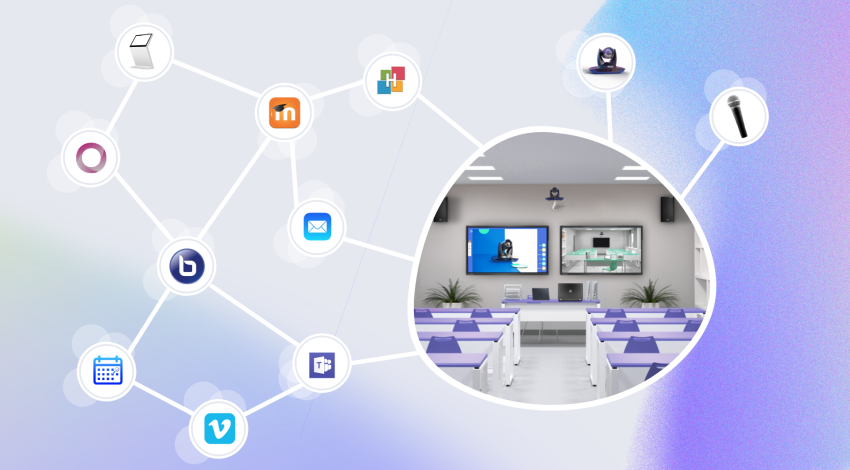
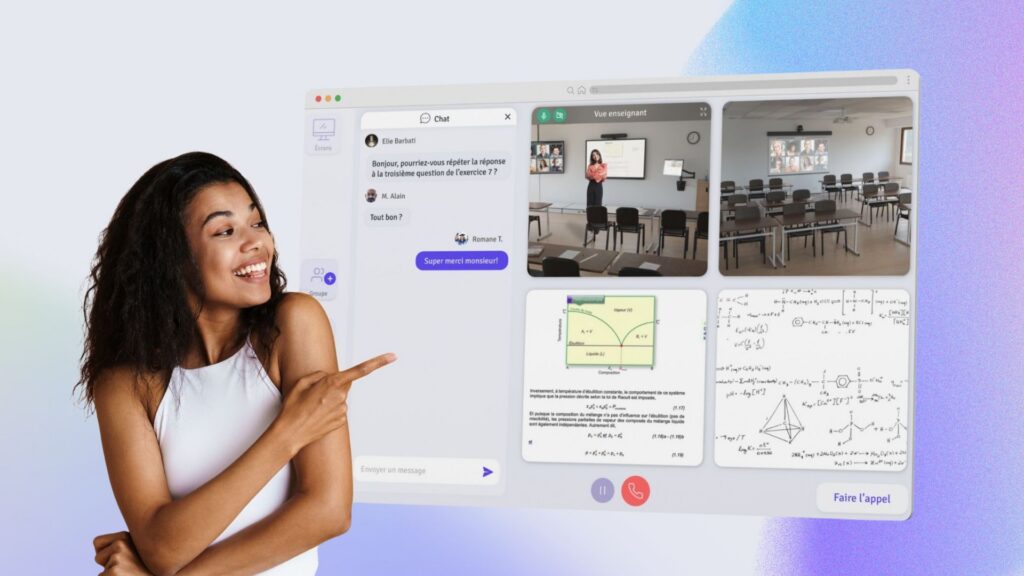
A HyFlex classroom infrastructure, like Kalyzée Connect, addresses this problem by operating at the room level rather than the teacher’s workstation. Dedicated cameras (automatic teacher tracking, a wide view of the room, a view of the board) and ceiling microphones capture the entire session, including contributions from students present in the room.
The remote student receives these different feeds simultaneously and chooses which one to enlarge, just as if they were sitting in the front row. The class is automatically available live and on demand for replay, with automatic attendance tracking, live quizzes and polls, and the option for a remote student to “come up to the board.” For the teacher, the experience is deliberately minimal: the class is linked to the institution’s schedule, they click on their session, and they teach — with no technical controls to manage.
That’s the whole point of the HyFlex classroom: not asking the teacher to become a video director, and not asking the remote student to settle for a diminished webcam view.
Synchronous remote classes in higher education
Remote teaching, in all its forms, holds a growing but targeted place in French higher education. According to INSEE, about 12% of first-year places offered on Parcoursup include remote teaching formats, with a particular concentration in certain fields (health, work-study programs, BTS). This growth hasn’t come at the expense of in-person teaching: it’s been added on top of it, most often in a combined form — exactly the logic of HyFlex teaching, of which the synchronous remote class is the central building block.
For networks of institutions spread across several sites, the synchronous remote class addresses a very concrete challenge: letting the same teacher cover several campuses without duplicating classes, and letting a student absent from a given site follow the program without interruption. This is exactly the resource-sharing logic that Kalyzée Connect was designed to industrialize, at the scale of a network of schools.
6 best practices for a successful synchronous class
- Break it into short, active segments. Alternate between lecturing, questions, polls, or exercises every fifteen to twenty minutes rather than running one long, continuous lecture format.
- Always pair the live session with a replay. This solves the schedule rigidity issue without giving up the benefits of real time.
- Prioritize sound over image. Poor capture of questions asked in the room isolates the remote student more than an imperfect picture does.
- Give the remote student a real way to take part (moderated chat, speaking up, coming up to the board), not just to watch.
- Take the technical burden off the teacher. The more clicks a teacher needs to start a class, the higher the risk of it being abandoned or misused.
- Think of equipment at the room level, not the workstation level, as soon as the remote audience exceeds a few people or broadcasting becomes a regular occurrence.
FAQ
What is a synchronous class? A synchronous class is one in which the teacher and learners interact in real time, at a set schedule, whether or not they’re in the same place. When remote, it’s called a synchronous remote class.
What’s the difference between synchronous and asynchronous? A synchronous class has a set schedule and allows immediate interaction; an asynchronous class is accessed freely, with no time constraint, but with no live exchange.
What’s the difference between HyFlex and hybrid? In a hybrid class, the teacher plans the alternation between in-person and remote sessions. In a HyFlex class, all three modes (in-person, synchronous remote, asynchronous) are offered in parallel, and the student chooses, session by session.
Can a synchronous remote class replace in-person teaching? It’s not a replacement but an extension: the synchronous remote class lets students who can’t attend follow a session that, most often, is taking place at the same time for students present in the room.
What tools can be used to broadcast a synchronous class? Traditional video conferencing works for small formats. To broadcast a class taking place in a room, with several feeds (teacher, board, room) and reliable live and replay broadcasting, a HyFlex classroom infrastructure like Kalyzée Connect is better suited.